


How are the functional marks defined in the Single Line Diagram provided by eDesign Small Building Application
Issue: Defining the functional marks in the Single Line Diagram
Product Line: eDesign Small Building https://edesign-630.se.com/
Cause: Need to tag devices to do the wiring and cabling of the switchboard.
in the diagram (from left to right and then from top to bottom whatever the function is).
Q : Circuit breaker, Circuit breaker with earth-leakage protection, Fuse
I : Switch, earth-leakage switch, Automatic reset for earth Leakage switch
CT : Contactor
TL : Impulse relay
CTS : BAES
IH : Time switch
IC : Twilight switch
EM : Energy Measurement
PFR : Surge arrestor
X : Socket and other functions
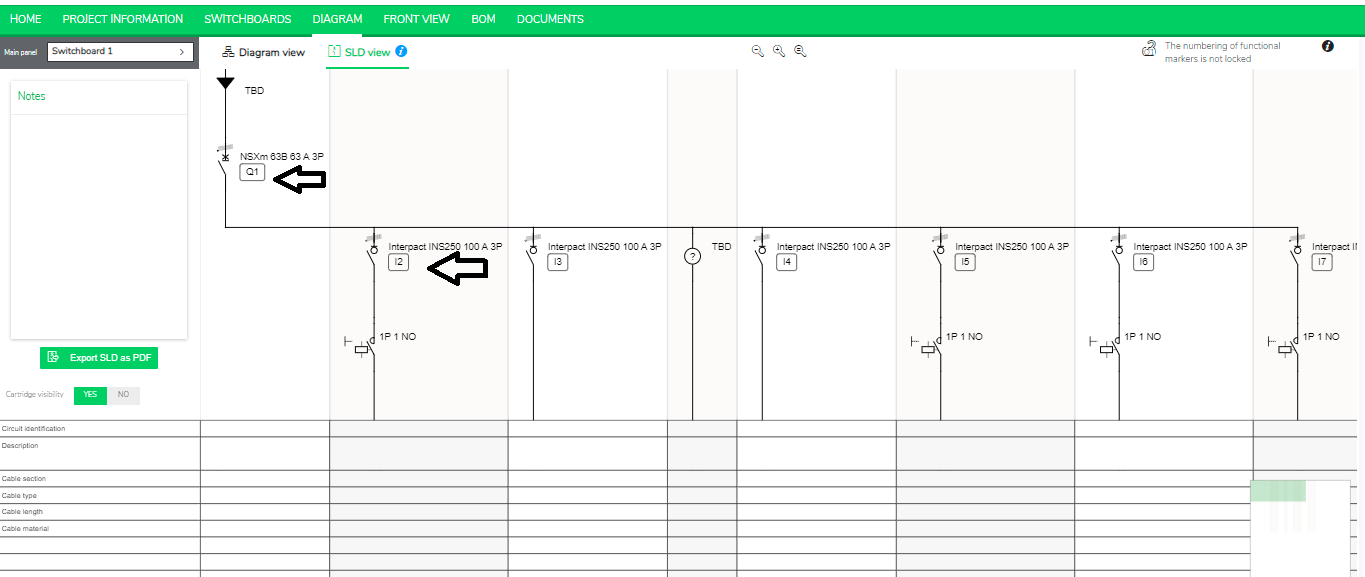
Go to the Diagram tab and select the “SLD View” , under each device you will see a functional mark.
Product Line: eDesign Small Building https://edesign-630.se.com/
Cause: Need to tag devices to do the wiring and cabling of the switchboard
Resolution:A functional mark is generated in the Single Line Diagram for each product whose function is listed below.
It isidentified by a letter indicating the function and a number indicating the position of the devicein the diagram (from left to right and then from top to bottom whatever the function is).
Q : Circuit breaker, Circuit breaker with earth-leakage protection, Fuse
I : Switch, earth-leakage switch, Automatic reset for earth Leakage switch
CT : Contactor
TL : Impulse relay
CTS : BAES
IH : Time switch
IC : Twilight switch
EM : Energy Measurement
PFR : Surge arrestor
X : Socket and other functions
Go to the Diagram tab and select the “SLD View” , under each device you will see a functional mark.