


How to do a configuration in the Product Selector?
1) Start your configuration Choose the range of products you want to select product on, either on the web navigation or on the hierarchy of the mega selector.
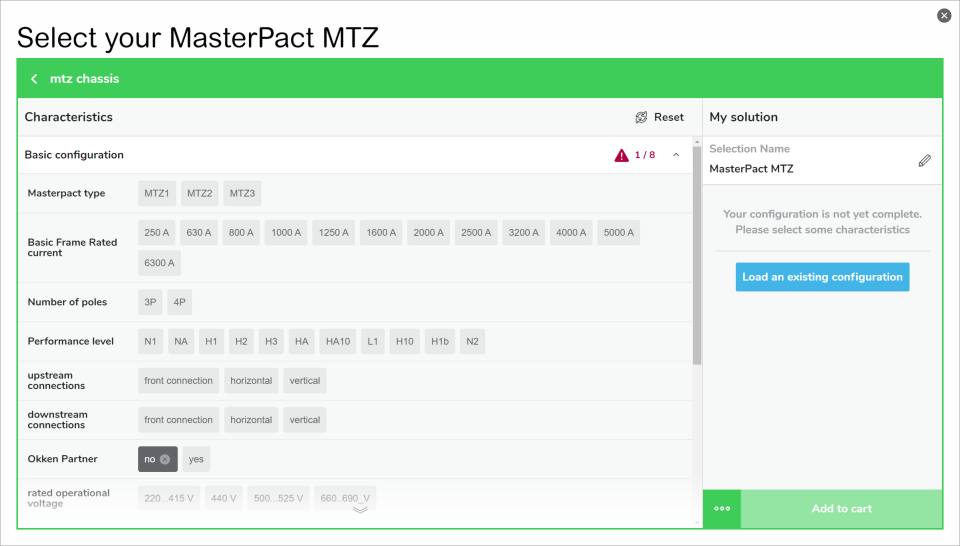
2) Selecting desired characteristics, options and auxiliaries Select the values that are corresponding the most to your answer to the questions TIPS: you can begin by any items you want; only compatible values are displayed
3) Watch out the completion of the configuration When the selection is completed the "Add to cart" button becomes green. If you still have a warning message at the right of the title of a characteristic that mean you did not answer all the required questions on this block. Scroll over the page to very there is no more warning signs.
2) Selecting desired characteristics, options and auxiliaries Select the values that are corresponding the most to your answer to the questions TIPS: you can begin by any items you want; only compatible values are displayed
3) Watch out the completion of the configuration When the selection is completed the "Add to cart" button becomes green. If you still have a warning message at the right of the title of a characteristic that mean you did not answer all the required questions on this block. Scroll over the page to very there is no more warning signs.
Released for: Schneider Electric United Arab Emirates
