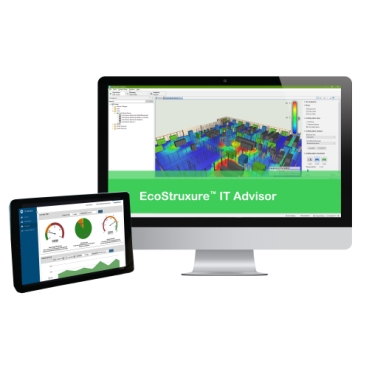
EcoStruxure™ IT Advisor

ZZ_Paragraph Title

ZZ_Paragraph Title

A clear digital twin

A clear digital twin

Creates a visual, digital model of all physical assets.

Smarter capacity planning

Smarter capacity planning

See where equipment fits, with enough power and cooling.

Predictive impact analysis

Predictive impact analysis

Simulate changes to understand their impact on capacity, energy use, and uptime.

Streamlined workflows

Streamlined workflows

Automate standardised workflows to reduce manual effort and minimise human error.

IT Advisor

IT Advisor

Key features

Digital Twin: See clearly before you act

A data centre digital twin shows racks, power, cooling, and dependencies in one model. It highlights capacity risks or conflicts before equipment is deployed. This prevents mistakes and increases confidence in planning.

Confident planning

Confident planning

Plan with precision using digital twins that deliver clarity and operational assurance.

Accurate asset modelling

Accurate asset modelling

Remove guesswork with vendor‑accurate Genomes for flawless asset representation.

Unified multi‑site control

Unified multi‑site control

Manage colo and multi‑site environments through one intuitive, scalable platform.

IT Advisor Mobile

Mobile data centre visualisation app that helps to improve operational efficiency.

Automated capture

Automated capture

Reduces manual workload.

Accurate inventory

Accurate inventory

Eliminates errors and discrepancies.

Faster changes

Faster changes

Real‑time data updates.

Control: Run with confidence every day

Operators monitor capacity, track changes, and manage assets across all sites. This prevents overloads or unexpected issues during day-to-day operations. Teams stay in control with clear, timely insights.

Optimise capacity

Optimise capacity

Unlock hidden capacity, forecast demand, and plan growth with intelligent, data‑driven insights.

Streamline change management

Streamline change management

Accelerate operations with automated, error‑reducing workflows and smart asset provisioning.

Enhance resilience

Enhance resilience

Strengthen uptime and reliability with risk analysis, failure simulation, and actionable analytics.

Optimisation: Improve continuously and intentionally

Organisations optimise energy use and sustainability impact across the data centre. They choose deployment models that support long-term strategy. Continuous insights help lower cost and improve performance over time.

Sustainability insights

Sustainability insights

Drive greener operations using dashboards that highlight key environmental metrics.

Flexible deployment

Flexible deployment

Choose the cloud or on‑prem model that best fits your strategy.

Secure and up-to-date

Secure and up-to-date

Ensure peak performance with frequent enhancements and uncompromised security.

Integrated cooling intelligence

As IT loads rise, smart cooling becomes the shield that keeps your data centre running reliably.

Airflow modelling

Airflow modelling

Predict thermal risks with CFD‑based airflow simulations.

Automated cooling control

Automated cooling control

Optimise cooling in real time using ML‑driven, closed‑loop adjustments.

Thermal performance insights

Thermal performance insights

Monitor hotspots, track cooling efficiency, and guide data‑driven improvements.

EcoDataCentre

With the efficiency gains from EcoStruxure IT Advisor, EcoDataCentre achieves a remarkably low power usage effectiveness.

Retirement Systems of Alabama

Colocation data centre leverages EcoStruxure to drive economic growth.

Ajman Bank

Our solution is protecting customer's data and creating a digital wall of resilience against threats.

Leading Edge

Accelerate the digital transformation in a more electric world.

Report IT Advisor - Top 10 DCIM Platform.
Calculator Calculate the cost of DCIM.
mySchneider Software Management Redeem digital vouchers, start new subscriptions, renew or modify existing ones and access the latest updates - all in just a few clicks.
EcoStruxure IT forum Schneider Electric support forum about installation and configuration for DCIM including EcoStruxure IT Expert, IT Advisor, Data Centre Expert, and NetBotz.
EcoStruxure IT security The EcoStruxure IT platform is security hardened with a mandatory two-factor authentication and high encryption standards.

Frequently Asked Questions

Yes. EcoStruxure™ IT Advisor is a vendor‑agnostic DCIM platform that supports multi‑vendor environments. Customers can model and manage infrastructure from different manufacturers in one system, without being locked into a single hardware or vendor ecosystem.

EcoStruxure™ IT Advisor applies AI‑driven analytics to DCIM data to help identify capacity risks, optimise power and cooling utilisation, and support predictive planning. AI insights help teams proactively plan expansions and avoid bottlenecks before they impact operations.

As part of its DCIM capabilities, EcoStruxure™ IT Advisor models power distribution and cooling behaviour across the data centre. This helps teams understand available capacity, improve cooling efficiency, and plan changes without increasing risk or energy waste.

EcoStruxure™ IT Advisor integrates with EcoStruxure™ IT Data Centre Expert to connect real‑time monitoring with DCIM planning. This creates a closed‑loop workflow where live operational data feeds the digital twin for more accurate capacity planning and infrastructure optimisation.

EcoStruxure™ IT Advisor enables DCIM‑based what‑if simulations to validate power, cooling, and space before changes are made. This reduces risk during moves, adds, and changes (MACs) and supports long‑term capacity and growth planning.

EcoStruxure™ IT Advisor supports modern DCIM requirements such as hybrid IT, consolidation, and infrastructure modernisation. By serving as a single source of truth for assets, power, cooling, and space, it helps IT and facilities teams plan and execute changes with confidence.

Need help?

Need help?

Product Selector

Product Selector

Quickly and easily find the right products and accessories for your applications.

Get a Quote

Get a Quote

Start your sales enquiry online and an expert will connect with you.

Where to buy?

Where to buy?

Easily find the nearest Schneider Electric distributor in your location.

Help Centre

Help Centre

Find support resources for all your needs, in one place.

  • Products Documentation
  • Software Downloads
  • Product Selector
  • Product Substitution and Replacement
  • Help and Contact Centre
  • Find our Offices
  • Get a Quote
  • Where to buy
  • Schneider Electric Community
  • Careers
  • Company Profile
  • Report a misconduct
  • Accessibility
  • Newsroom
  • Investors
  • EcoStruxure
  • Job Search
  • Blog
  • Privacy Policy
  • Cookie Notice
  • Change your cookie settings