


Why after installation, Link Manager of EcoStruxure Secure Connect Advisor does not start?
Issue
"The issue may be caused by multiple reason:
- Link Manager service not started
- Problem of installation due to driver signature."
Product line / Environment
EcoStruxure Secure Connect Advisor / Link Manager (All version)
Resolution
1 - Link Manager service not started: Check that Link Manager is running on the machine

If in Task manager, you cannot see ""Schneider Electric LinkManager Service in the running service, go to ""c:\Program Files\Schneider Electric\LinkManager
And start LinkManagerSvc.exe"

2 - Problem of installation due to driver signature: Check that Link Manager adapter is present, if you cannot see it, that's mean, you faced the driver signature problem

To fix the issue, run "Command Prompt as administrator
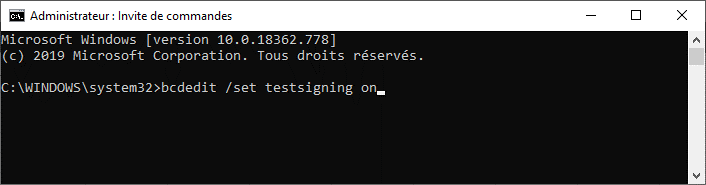
After reboot/reinstall, VirtualBox TAP Adapter is showed and LinkManager can start properly
Then, the signature can be reactivated using the command: bcdedit /set testsigning off
"The issue may be caused by multiple reason:
- Link Manager service not started
- Problem of installation due to driver signature."
Product line / Environment
EcoStruxure Secure Connect Advisor / Link Manager (All version)
Resolution
1 - Link Manager service not started: Check that Link Manager is running on the machine
If in Task manager, you cannot see ""Schneider Electric LinkManager Service in the running service, go to ""c:\Program Files\Schneider Electric\LinkManager
And start LinkManagerSvc.exe"
2 - Problem of installation due to driver signature: Check that Link Manager adapter is present, if you cannot see it, that's mean, you faced the driver signature problem
To fix the issue, run "Command Prompt as administrator
After reboot/reinstall, VirtualBox TAP Adapter is showed and LinkManager can start properly
Then, the signature can be reactivated using the command: bcdedit /set testsigning off