.svg)
Issue:
ATV61 or ATV71 change of the Profibus address with the optional Profibus card.
Product Line:
Altivar 61, Altivar 71
Environment:
Profibus network
Cause:
Configuration
Resolution:
Profibus card part numbers are VW3A3307 or VW3A3307S371.
The profibus address is set through a series of 8 dip switchs on the card beside the 9 pin profibus connector. The address is set in binary form. A switch in the up position indicates 0 and in the down position indicates 1. The least significant bit is the far right switch. Example, to set the address to 36 (binary 00100100). Place the switches in order from left to right: UP, UP, DOWN, UP, UP, DOWN, UP, UP.
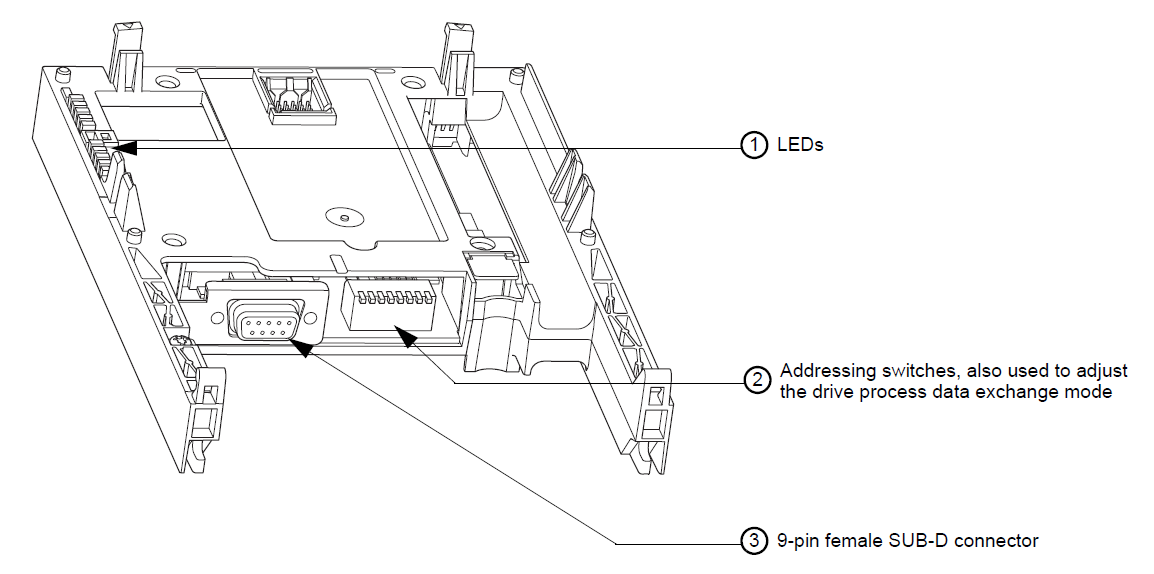
Refer to page 11 in either of the attached Profibus manuals for switch configurations. You can also download the manuals using these links:
ATV61/71 Profibus DP manual - VW3A3307
https://www.se.com/us/en/download/document/1755873/
ATV61/71 Profibus DPv1 manual - VW3A3307S371:
https://www.se.com/ww/en/download/document/AAV52935/
ATV61 or ATV71 change of the Profibus address with the optional Profibus card.
Product Line:
Altivar 61, Altivar 71
Environment:
Profibus network
Cause:
Configuration
Resolution:
Profibus card part numbers are VW3A3307 or VW3A3307S371.
The profibus address is set through a series of 8 dip switchs on the card beside the 9 pin profibus connector. The address is set in binary form. A switch in the up position indicates 0 and in the down position indicates 1. The least significant bit is the far right switch. Example, to set the address to 36 (binary 00100100). Place the switches in order from left to right: UP, UP, DOWN, UP, UP, DOWN, UP, UP.
Refer to page 11 in either of the attached Profibus manuals for switch configurations. You can also download the manuals using these links:
ATV61/71 Profibus DP manual - VW3A3307
https://www.se.com/us/en/download/document/1755873/
ATV61/71 Profibus DPv1 manual - VW3A3307S371:
https://www.se.com/ww/en/download/document/AAV52935/
게시 대상: 슈나이더 일렉트릭 Korea

