


Unity Pro: Momentum Unity 8.0 Import Failure
Goals and Symptoms
The purpose of this resolution is to inform users of a potential Import failure of Legacy Momentum applications into Unity 8.0.
Facts and Changes
The purpose of this resolution is to inform users of a potential Import failure of Legacy Momentum applications into Unity 8.0.
Facts and Changes
It has been discovered that Legacy Momentum applications will fail Import into Unity 8.0 if there is no I/O configured.
The failure that occurs is:
This error can be eliminated by adding one or more I/O bases to the Legacy configuration.
Concept with IEC:
Concept must be used in editing the Traffic Cop.
Add a I/O module to the Traffic Cop using Concept. The module can be added as an I/O Base or I/O Bus module. Save the program under a similar but unique name. Using the Concept Convertor, generate the .asc file for Unity Import.
LL984:
Add a I/O module to the Traffic Cop using the Legacy software. The module can be added as an I/O Base or I/O Bus module. Save the program under a similar but unique name.
If the Legacy software is unavailable, ProWORX 32 (Install or Demo versions) can be used to Import the original Database into ProWORX 32 for Traffic Cop editing. The available Database conversion formats are: ProWORX NxT/ Plus (.dcf), Modsoft (.cfg), and Concept 984 (.asc). Then save the program in the .pwx format for Unity Import.
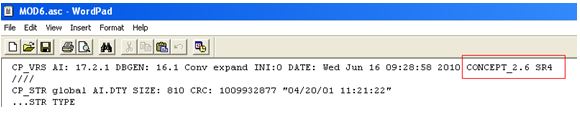
NOTE 1: The Concept Convertor must be used to extract files from the transportable file structure of the .asc. The Concept version required to open the extracted files must be equal to or newer than what was used to export the application into the .asc format. The Concept version can be easily found by opening the .asc with a txt editor such as Notepad or Wordpad. The Concept information is in the first line of the opened .asc file.
Notepad example:

Wordpad example:
NOTE 2: Since this new module is not active in the system, make sure that the references assigned is not used in the project (logic, I/O Scanner, Peer Cop, etc..).
NOTE 3:If the new module is added as the Base, it cannot be replaced or deleted directly in Unity 8.
Causes and Fixes
N/A
Causes and Fixes
N/A