


How do I resolve a connection issue with SoMove and an Altivar drive when getting error during scanning, after I've set baud rate, format, parity and the COM port?
Issue:
SoMove will get an error when attempting to scan or connect to a device.
Product Line:
SoMove, ATV61, ATV71, ATV212, ATV312, ATV12, ATV32
Environment:
All serial number
Cause:
An error occurred during the installation
Resolution:
Make sure the USB driver and ModBus drivers are installed and are working.
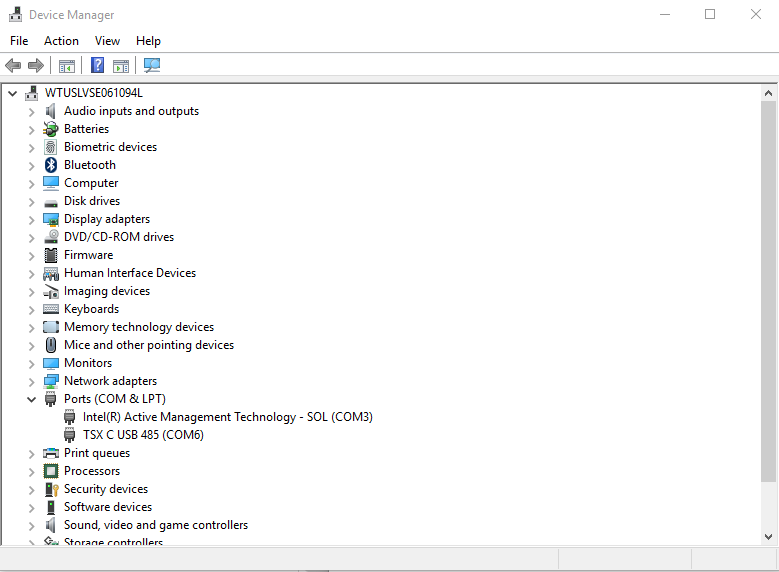
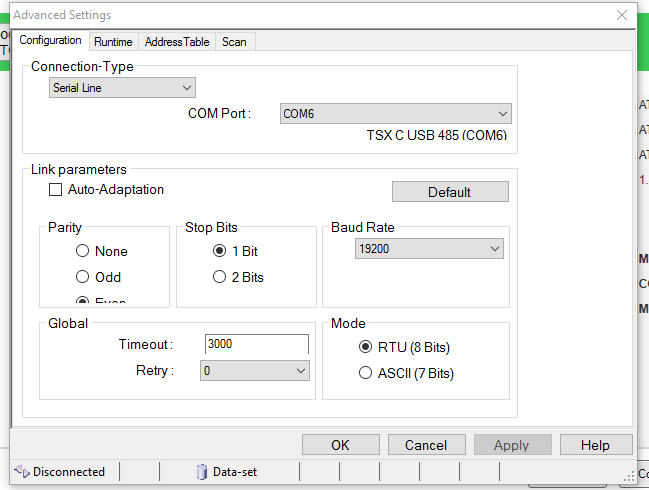
Check your COM's settings for the USB cable (Device Manager on your PC and Advanced Settings in SoMove). Make sure the same COM port is being used for the cable in both places.
If you are still having issues you may want make sure the current DTM libraries are installed. You may also need to uninstall the DTM libraries and reinstall them.
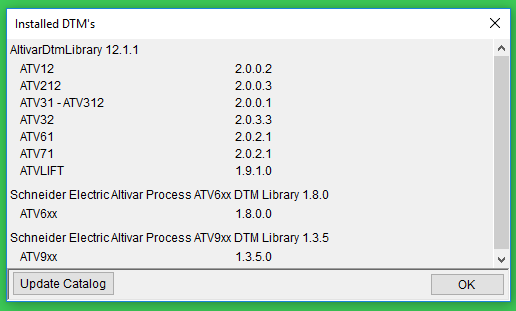
As a last resort you may have to uninstall and reinstall the SoMove software.
SoMove will get an error when attempting to scan or connect to a device.
Product Line:
SoMove, ATV61, ATV71, ATV212, ATV312, ATV12, ATV32
Environment:
All serial number
Cause:
An error occurred during the installation
Resolution:
Make sure the USB driver and ModBus drivers are installed and are working.
Check your COM's settings for the USB cable (Device Manager on your PC and Advanced Settings in SoMove). Make sure the same COM port is being used for the cable in both places.
If you are still having issues you may want make sure the current DTM libraries are installed. You may also need to uninstall the DTM libraries and reinstall them.
As a last resort you may have to uninstall and reinstall the SoMove software.