


Web Tables Measurement Selector is Missing Measurements in PME
Issue
The measurement selector in the Web Tables (or Real Time Tables) feature in Power Monitoring Expert 7.x.x is not displaying a complete list of measurements available for the devices selected.
Product Line
StruxureWare Power Monitoring 7.0.x
Power Monitoring Expert 7.2.x
Environment
Web Tables
Real Time Tables
Cause
This issue is due to the fact that the measurement selector is defaulted to "Common Measurements". The selector will need to be changed to "All Measurements" to view a complete list.
Resolution
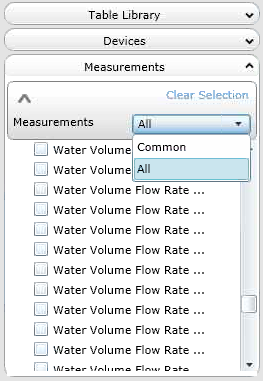
In order to modify the source selector, click on the graphic shaped like a V to open the drop-down menu. Once opened, change the option from Common to All.
The measurement selector in the Web Tables (or Real Time Tables) feature in Power Monitoring Expert 7.x.x is not displaying a complete list of measurements available for the devices selected.
Product Line
StruxureWare Power Monitoring 7.0.x
Power Monitoring Expert 7.2.x
Environment
Web Tables
Real Time Tables
Cause
This issue is due to the fact that the measurement selector is defaulted to "Common Measurements". The selector will need to be changed to "All Measurements" to view a complete list.
Resolution
In order to modify the source selector, click on the graphic shaped like a V to open the drop-down menu. Once opened, change the option from Common to All.