


How do you set the IP Address of a M340 CPU?
Issue
Set IP Address of M340 CPU
Product Line
Modicon M340
Resolution
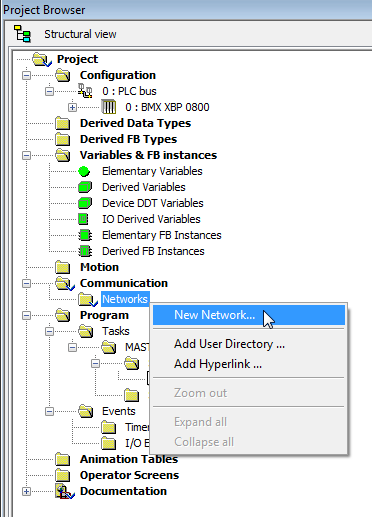
To set the IP Address to a M340 CPU, a new network needs to be setup. In the project browser, expand the Communication folder then right click on Networks and select New Network…
Set up an Ethernet network and name it. The default name is Ethernet_1. Click OK. You will see Ethernet_1 under your Networks folder. Double-click the Ethernet_1 network and the configuration screen will appear.
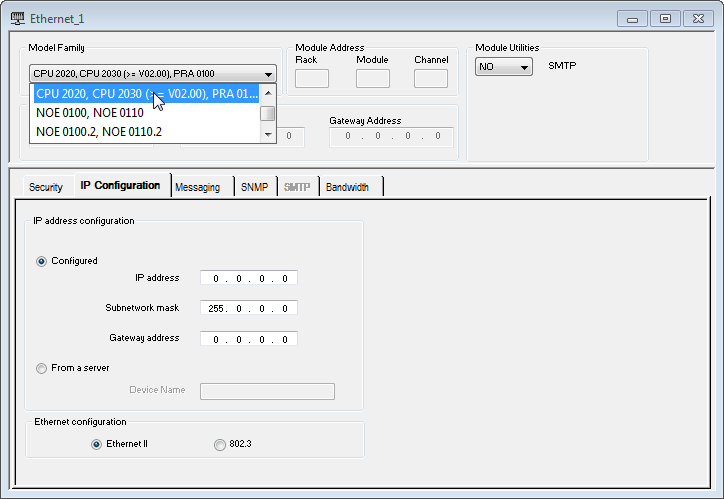
Within the Ethernet network configuration the appropriate Model Family needs to be selected. The default Ethernet model family is set to a NOE. The model family needs to be set to CPU 2020, CPU 2030 (>= V02.00) for a CPU. If you hover over the different model family options with your mouse you will see what each option covers as far as CPU's and NOE's.
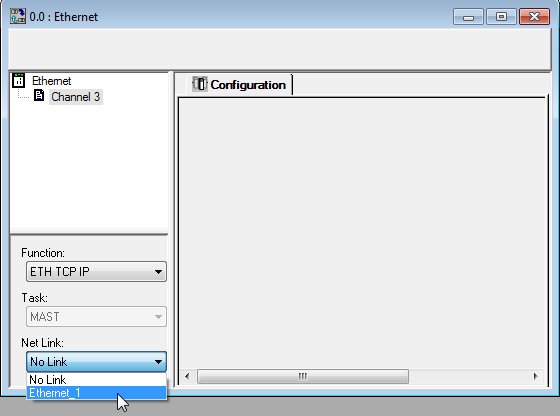
Once the correct model family has been selected, the new network has to be linked to the CPU. To link the network, select the Ethernet port on the CPU from the Project Browser. The CPU Ethernet Configuration screen will come up. On that screen you will link the network previously setup, as seen below.
Set IP Address of M340 CPU
Product Line
Modicon M340
Resolution
To set the IP Address to a M340 CPU, a new network needs to be setup. In the project browser, expand the Communication folder then right click on Networks and select New Network…
Set up an Ethernet network and name it. The default name is Ethernet_1. Click OK. You will see Ethernet_1 under your Networks folder. Double-click the Ethernet_1 network and the configuration screen will appear.
Within the Ethernet network configuration the appropriate Model Family needs to be selected. The default Ethernet model family is set to a NOE. The model family needs to be set to CPU 2020, CPU 2030 (>= V02.00) for a CPU. If you hover over the different model family options with your mouse you will see what each option covers as far as CPU's and NOE's.
Once the correct model family has been selected, the new network has to be linked to the CPU. To link the network, select the Ethernet port on the CPU from the Project Browser. The CPU Ethernet Configuration screen will come up. On that screen you will link the network previously setup, as seen below.