


Video: PME installer proceeds through 'Ready to Configure' but then terminates on Copying Files step
Issue
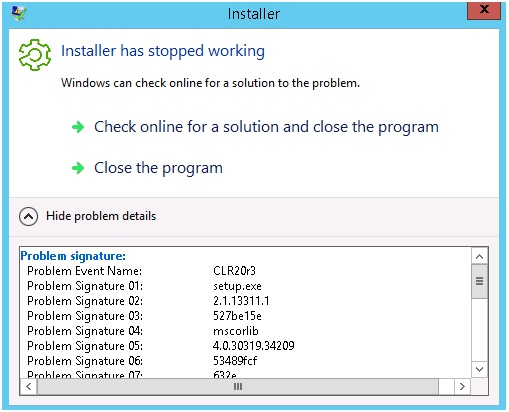
When running the Struxureware Power Monitoring (SPM), Power Monitor Expert (PME), or the EEM installer, the installation process proceeds to
the 'Ready to Configure' stage, but when the 'Next' button is clicked to continue to 'Copying Files', the Installer terminates with an error dialog.
Product Line
Struxureware Power Monitoring
Power Monitoring Expert
ION EEM
ION Setup
Environment
Schneider Electric Power Monitoring Software Applications
Cause
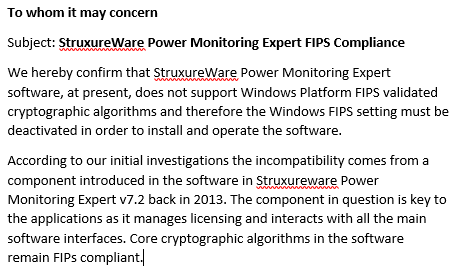
When the the Windows Security Policy 'System cryptography: Use FIPS compliant algorithms for encryption, hashing and signing' - is enabled, it is not possible to install the software.
Resolution
The Windows Security Policy 'System cryptography: Use FIPS compliant algorithms for encryption, hashing and signing' needs to be disabled while the software is installed.
FIPS stands for Federal Information Processing Standards
Procedure:
1.) In Control Panel, click Administrative Tools, and then double-click Local Security Policy
2.) In Security Settings, Expand Local Policies, and then click Security Options
3.) Find System cryptography: Use FIPS compliant algorithms for encryption, hashing, and signing
4.) Double click this option and then select the disable radial button and click OK
For more detailed instructions see the video below.
Additional Note:
This will also apply if using an EWS Server. The EWS server will not work if FIPs is enabled
FIPS must remain disabled after PME software installation.
Below is the official Scheneider Electric Statement:
When running the Struxureware Power Monitoring (SPM), Power Monitor Expert (PME), or the EEM installer, the installation process proceeds to
the 'Ready to Configure' stage, but when the 'Next' button is clicked to continue to 'Copying Files', the Installer terminates with an error dialog.
Product Line
Struxureware Power Monitoring
Power Monitoring Expert
ION EEM
ION Setup
Environment
Schneider Electric Power Monitoring Software Applications
Cause
When the the Windows Security Policy 'System cryptography: Use FIPS compliant algorithms for encryption, hashing and signing' - is enabled, it is not possible to install the software.
Resolution
The Windows Security Policy 'System cryptography: Use FIPS compliant algorithms for encryption, hashing and signing' needs to be disabled while the software is installed.
FIPS stands for Federal Information Processing Standards
Procedure:
1.) In Control Panel, click Administrative Tools, and then double-click Local Security Policy
2.) In Security Settings, Expand Local Policies, and then click Security Options
3.) Find System cryptography: Use FIPS compliant algorithms for encryption, hashing, and signing
4.) Double click this option and then select the disable radial button and click OK
For more detailed instructions see the video below.
Additional Note:
This will also apply if using an EWS Server. The EWS server will not work if FIPs is enabled
FIPS must remain disabled after PME software installation.
Below is the official Scheneider Electric Statement: