


How is damper control configured on the ATV212 series drive?
Issue:
Damper control configuration on the ATV212 series drive
Product Line:
Altivar 212 series drives.
Environment:
All models and serial numbers with firmware revision 1.5 or greater.
Cause:
Damper control configuration assistance needed with this drive.
Resolution:
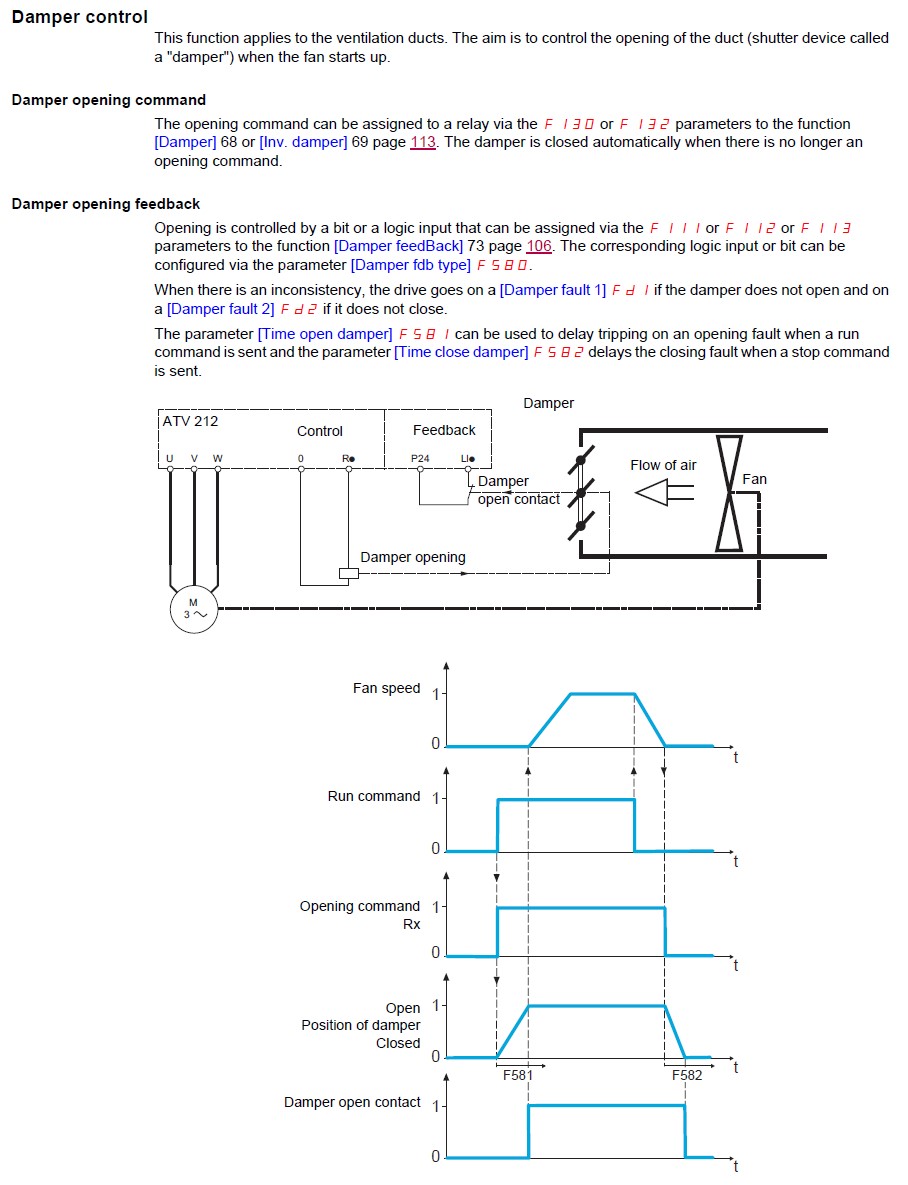
Damper control on the ATV212 drive requires 3 settings to be adjusted. You need to configure a relay output to control the damper, then you need to configure a logic input to monitor the damper status via the damper end switch, and finally the parameter F580 needs to be configured for the type of feedback switch your damper has. See details from the ATV212 Programming manual below:
NOTE: Damper Control in the enclosed ATV212 S-Flex drive package is managed differently. Consult the S-Flex documentation for details.
Damper control configuration on the ATV212 series drive
Product Line:
Altivar 212 series drives.
Environment:
All models and serial numbers with firmware revision 1.5 or greater.
Cause:
Damper control configuration assistance needed with this drive.
Resolution:
Damper control on the ATV212 drive requires 3 settings to be adjusted. You need to configure a relay output to control the damper, then you need to configure a logic input to monitor the damper status via the damper end switch, and finally the parameter F580 needs to be configured for the type of feedback switch your damper has. See details from the ATV212 Programming manual below:
NOTE: Damper Control in the enclosed ATV212 S-Flex drive package is managed differently. Consult the S-Flex documentation for details.