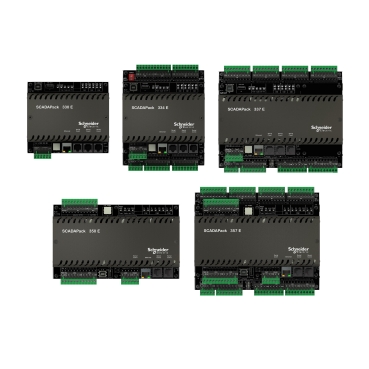
Configuring Command Line Communications on a SCADAPack E rPAC/RTU
The SCADAPack E has many useful diagnostic tools to help troubleshoot multiple operational challenges. One of the most useful tools is the command line interface. Command Line connections can be enabled via Telnet or by a serial port configured for command line. Some device information and device management commands can also be used on the Remote Command Line (Virtual Terminal) in SCADAPack E Configurator.
The following command types are available on some of the interfaces below:
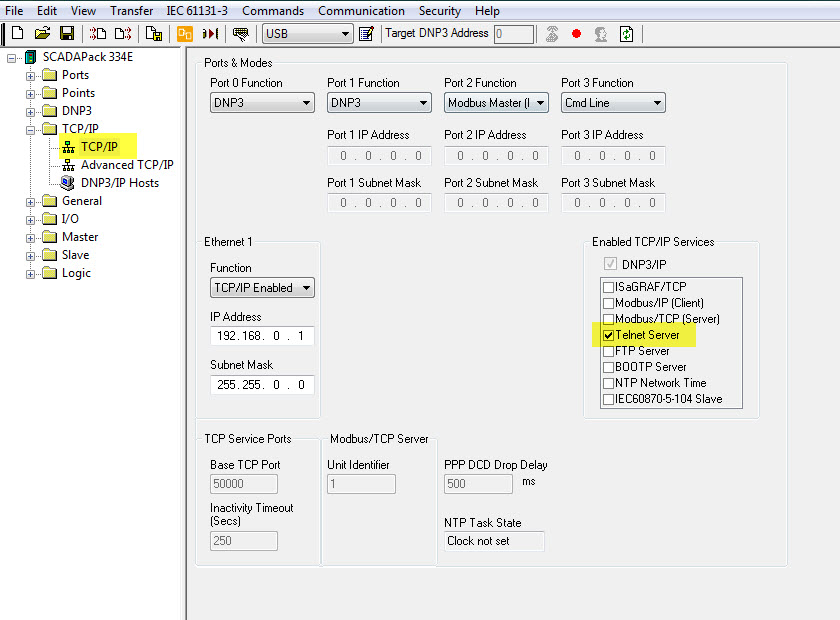
Many telemetry systems use DNP3 TCP/IP or Modbus TCP/IP communications on the SCADAPack E, by enabling the Telnet Server on the RTU, command line diagnostics is permanently enabled on the Ethernet port. If Telnet Server is not enabled, the SCADAPack E will need to be restarted in order to enable this service after a configuration download. Sometimes an RTU restart is not desirable.
Consideration for security should be made in the SCADA system as the Telnet port will always be open. This is port 23.
To enable the Telnet Server, simply ensure the service is checked on the Enabled TCP/IP Services section of E Series Configurator. A 3rd party terminal program will be needed to make the Terminal connection to the SCADAPack E. All commands listed above can be used on this interface.
Serial Port
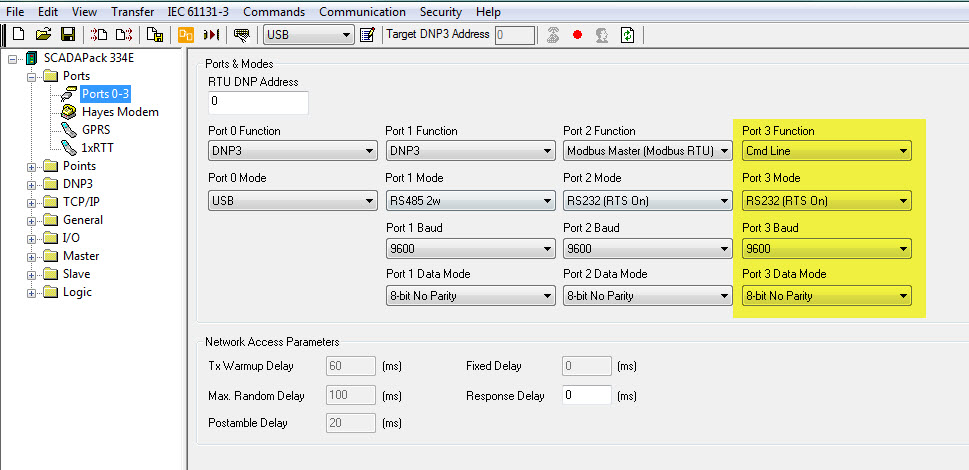
If a SCADAPack E is not using a serial port for regular communication protocols, it can be permanently enabled to be a Command Line interface port. Once again, a serial port change requires a restart of the SCADAPack E, so it is best to configure the mode before you need to use the diagnostic tools.
A 3rd party terminal program will be needed to make the serial connection to the SCADAPack E. All commands listed above can be used on this interface.
Remote Command (Virtual Terminal)
The virtual terminal does not enable the user to use the Diagnostics command set, yet a SCADAPack E restart is not needed to use this tool. A 3rd party tool is also not required.
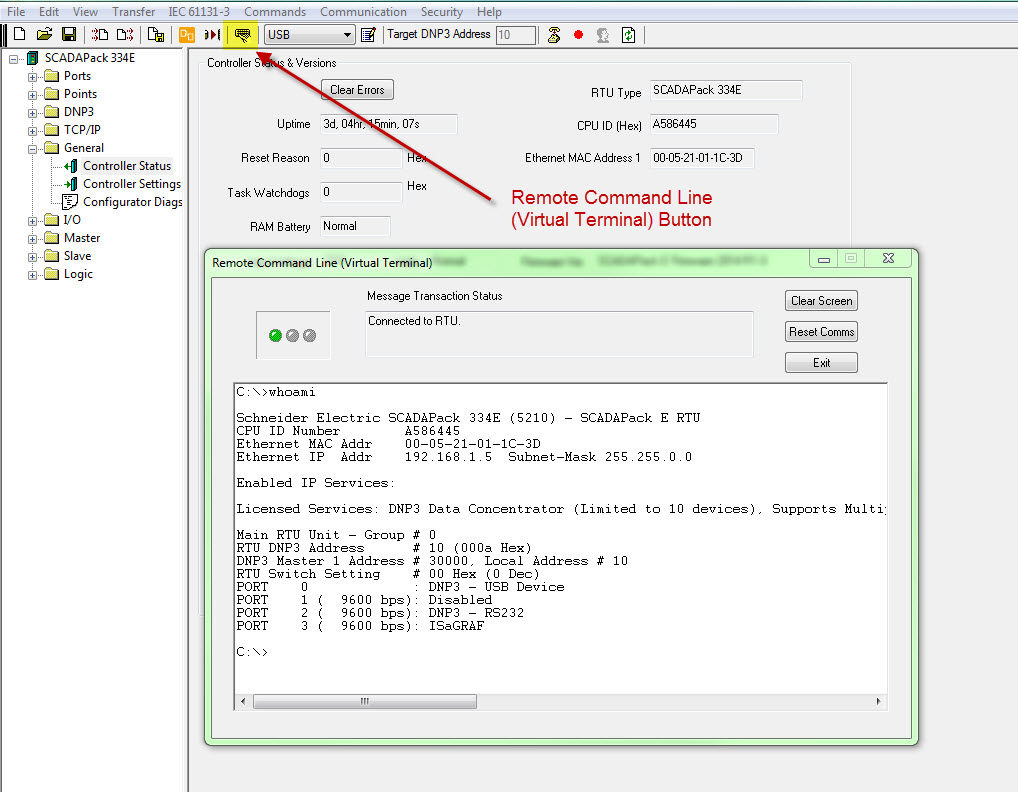
The virtual command line interface is accessed when the end user has a good DNP3 connection to the SCADAPack E and they open the interface through the TRANSFER menu or button option in SCADAPack E Configurator.
Below, the Virtual Terminal is used with the Device Information “whoami” command”.
More details on the available commands for each interface can be found in the SCADAPack E “Command Line and Diagnostics Commands” help section of the Technical Reference manuals installed with SCADAPack E Utilities.
The following command types are available on some of the interfaces below:
- Device Information
- Device Management
- File Commands
- Status Commands
- Diagnostic Commands
- TCP/IP Commands
Many telemetry systems use DNP3 TCP/IP or Modbus TCP/IP communications on the SCADAPack E, by enabling the Telnet Server on the RTU, command line diagnostics is permanently enabled on the Ethernet port. If Telnet Server is not enabled, the SCADAPack E will need to be restarted in order to enable this service after a configuration download. Sometimes an RTU restart is not desirable.
Consideration for security should be made in the SCADA system as the Telnet port will always be open. This is port 23.
To enable the Telnet Server, simply ensure the service is checked on the Enabled TCP/IP Services section of E Series Configurator. A 3rd party terminal program will be needed to make the Terminal connection to the SCADAPack E. All commands listed above can be used on this interface.
Serial Port
If a SCADAPack E is not using a serial port for regular communication protocols, it can be permanently enabled to be a Command Line interface port. Once again, a serial port change requires a restart of the SCADAPack E, so it is best to configure the mode before you need to use the diagnostic tools.
A 3rd party terminal program will be needed to make the serial connection to the SCADAPack E. All commands listed above can be used on this interface.
Remote Command (Virtual Terminal)
The virtual terminal does not enable the user to use the Diagnostics command set, yet a SCADAPack E restart is not needed to use this tool. A 3rd party tool is also not required.
The virtual command line interface is accessed when the end user has a good DNP3 connection to the SCADAPack E and they open the interface through the TRANSFER menu or button option in SCADAPack E Configurator.
Below, the Virtual Terminal is used with the Device Information “whoami” command”.
More details on the available commands for each interface can be found in the SCADAPack E “Command Line and Diagnostics Commands” help section of the Technical Reference manuals installed with SCADAPack E Utilities.
게시 대상: 슈나이더 일렉트릭 Korea