


Starting Unity returns the error 'Cannot execute the init function in the tool: CFETHNETWORKUIHOST'
Issue
Starting Unity returns the error 'Cannot execute the init function in the tool: CFETHNETWORKUIHOST'
Product Line
Unity
Environment
Unity
Resolution
Starting Unity returns the error 'Cannot execute the init function in the tool: CFETHNETWORKUIHOST'. This has been
reported to occur after updating Microsoft Excel on a PC running Unity 11.0. The update of Microsoft Excel to the latest
version also updated the '.NET Framework' libraries that were installed on the PC.
The 'CFETHNETWORKUIHOST.dll' is used by the 'Network Inspector' feature and requries the use of '.NET Framework 3.5'.
The Network Inspector tool is used with the 140 CRP 312 00 remote I/O head modules, 140 NOC 780 00 distributed I/O head
modules, and 140 NOC 781 00 control head modules. Only devices enabled in the address server (DHCP) are controlled.
The issue could be caused by the update of '.NET Framework' replacing some of the .NET Framework 3.5 components.
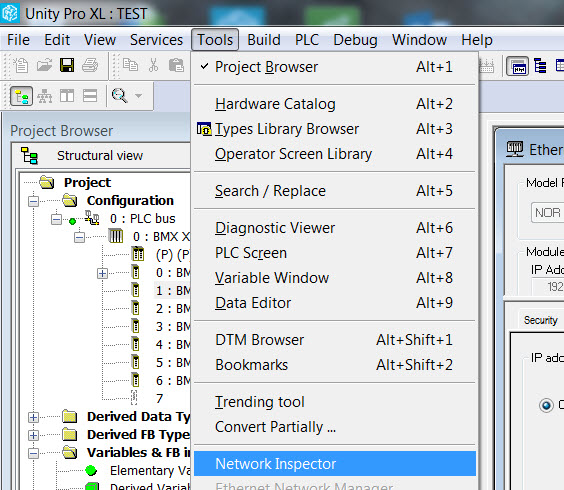
The following options steps can be used to resolve the issue.
To perform a repair of Unity: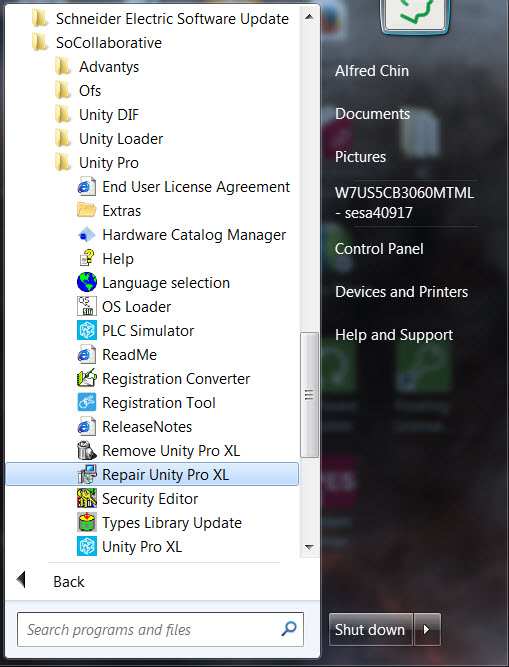
To perform a reinstall of .NET,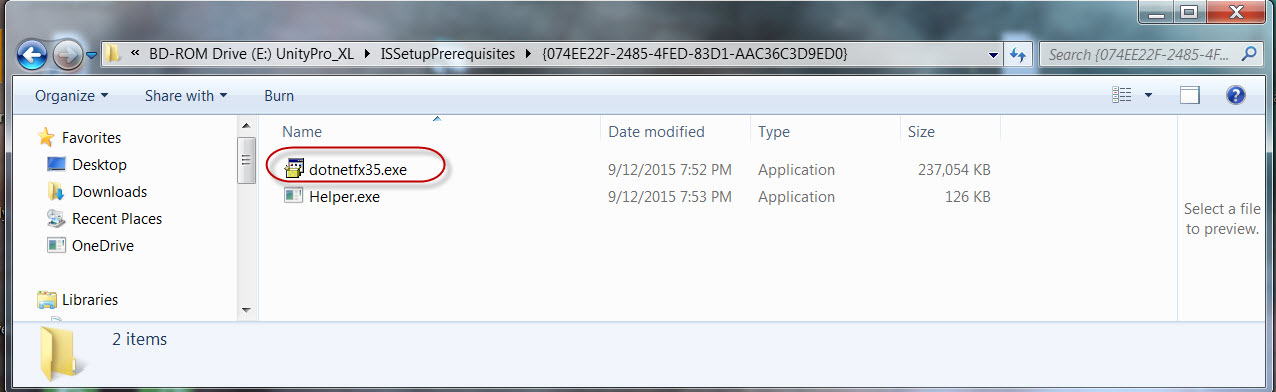
Starting Unity returns the error 'Cannot execute the init function in the tool: CFETHNETWORKUIHOST'
Product Line
Unity
Environment
Unity
Resolution
Starting Unity returns the error 'Cannot execute the init function in the tool: CFETHNETWORKUIHOST'. This has been
reported to occur after updating Microsoft Excel on a PC running Unity 11.0. The update of Microsoft Excel to the latest
version also updated the '.NET Framework' libraries that were installed on the PC.
The 'CFETHNETWORKUIHOST.dll' is used by the 'Network Inspector' feature and requries the use of '.NET Framework 3.5'.
The Network Inspector tool is used with the 140 CRP 312 00 remote I/O head modules, 140 NOC 780 00 distributed I/O head
modules, and 140 NOC 781 00 control head modules. Only devices enabled in the address server (DHCP) are controlled.
The issue could be caused by the update of '.NET Framework' replacing some of the .NET Framework 3.5 components.
The following options steps can be used to resolve the issue.
- Perform a repair of of Unity
- Reinstall .NET Framework libraries used by Unity.
- Update to Unity 11.1
To perform a repair of Unity:
- Click on Start\Programs.
- Click on SoCollaborative
- Click on Unity Pro
- Click on 'Repair Unity Pro XL'.
To perform a reinstall of .NET,
- Open the folder for the installation DVD for Unity.
- Open the folder named 'ISSetupPrerequisites'
- Open the folder named '{074EE22F-2485-4FED-83D1-AAC36C3D9ED0}'
- Double Click on the fie named 'dotnetfx3.5.exe'