


How is PID programmed on the ATV320 drives?
Issue:
ATV320 PID set up.
Product line:
ATV320, Altivar 320
Environment:
all
Cause:
To maintain pressure, temperature or flow within a system
Resolution:
Using the dial on the display, Push Enter and turn to CONF > FULL > FUN > PID.
Under the PID Regulator menu set:
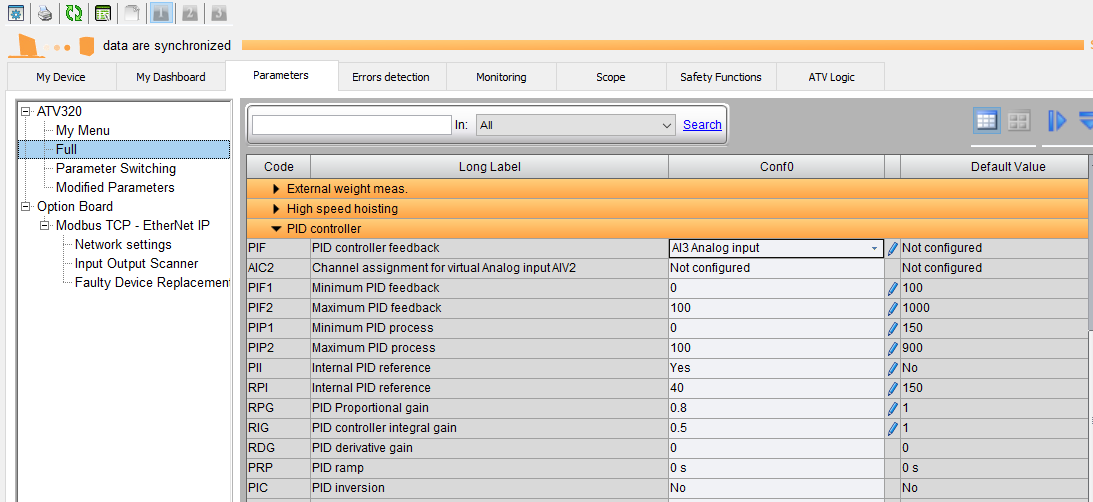
PIF - PID feedback assignment
PIF1 - Min PID feedback
PIF2 - Max PID feedback
PIP1 - Min PID reference
PIP2 - Max PID reference
PII - Act. Internal PID ref
RPI - Internal PID ref
Min/Max PID Reference and Feedback are typically set to the range of the transducer. Act. Internal PID turns on the internal set point. Internal PID ref is the set point you want to maintain.
Example:
You have a transducer, 4-20 mA output with a 0-100PSI range wired to AI3 and COM. You want to maintain 40PSI pressure. The recommended settings would be:
PIF - AI3
PIF1 - 0
PIF2 - 100
PIP1 - 0
PIP2 - 100
PII - yes
RPI - 40
This would maintain 40PSI (10.4 mA feedback) in the system based on 4-20 mA signal coming into AI3.
Feedback < 10.4 mA will increase motor speed.
Feedback > DVD will decrease motor speed.
If the VFD reaction needs to be reversed, set PiC, PID correct reverse, to YES.
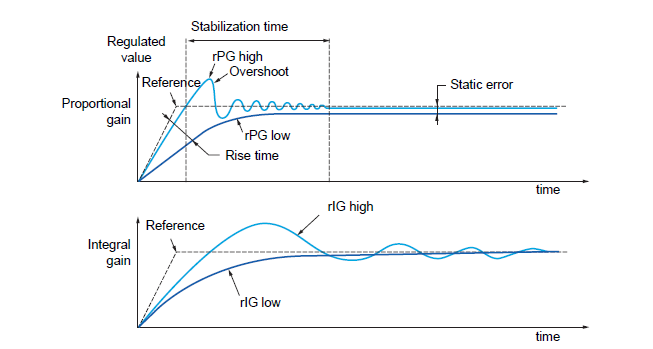
RPG: PID Proportional gain and RIG: PID controller integral gain will usually need adjustment to limit overshoot and to stablize the response to system changes. For most pump and fan applications, settings less than 1 provide acceptable response and the RDG: PID derivative gain can be left at 0.
If RPG is too high the system will overshoot the setpoint and can have significant instability before approaching the setpoint.
If RPG is too low the system may never reach it's setpoint.
If RIG is too high the system will search or hunt around the setpoint, taking a long time to stabilize.
If RIG is too low the system will take a long time to reach setpoint.
This is where you'll find the settings in SoMove:
The full ATV320 Programming Manual can found here: https://www.schneider-electric.us/en/download/document/NVE41295/
ATV320 PID set up.
Product line:
ATV320, Altivar 320
Environment:
all
Cause:
To maintain pressure, temperature or flow within a system
Resolution:
Using the dial on the display, Push Enter and turn to CONF > FULL > FUN > PID.
Under the PID Regulator menu set:
PIF - PID feedback assignment
PIF1 - Min PID feedback
PIF2 - Max PID feedback
PIP1 - Min PID reference
PIP2 - Max PID reference
PII - Act. Internal PID ref
RPI - Internal PID ref
Min/Max PID Reference and Feedback are typically set to the range of the transducer. Act. Internal PID turns on the internal set point. Internal PID ref is the set point you want to maintain.
Example:
You have a transducer, 4-20 mA output with a 0-100PSI range wired to AI3 and COM. You want to maintain 40PSI pressure. The recommended settings would be:
PIF - AI3
PIF1 - 0
PIF2 - 100
PIP1 - 0
PIP2 - 100
PII - yes
RPI - 40
This would maintain 40PSI (10.4 mA feedback) in the system based on 4-20 mA signal coming into AI3.
Feedback < 10.4 mA will increase motor speed.
Feedback > DVD will decrease motor speed.
If the VFD reaction needs to be reversed, set PiC, PID correct reverse, to YES.
RPG: PID Proportional gain and RIG: PID controller integral gain will usually need adjustment to limit overshoot and to stablize the response to system changes. For most pump and fan applications, settings less than 1 provide acceptable response and the RDG: PID derivative gain can be left at 0.
If RPG is too high the system will overshoot the setpoint and can have significant instability before approaching the setpoint.
If RPG is too low the system may never reach it's setpoint.
If RIG is too high the system will search or hunt around the setpoint, taking a long time to stabilize.
If RIG is too low the system will take a long time to reach setpoint.
This is where you'll find the settings in SoMove:
The full ATV320 Programming Manual can found here: https://www.schneider-electric.us/en/download/document/NVE41295/
게시 대상: 슈나이더 일렉트릭 Korea

도움이 필요하신가요?
제품 선택기
애플리케이션에 적합한 제품과 액세서리를 빠르고 쉽게 찾을 수 있습니다.
견적 받기
영업 관련하여 온라인으로 문의하시면 전문가가 연락드립니다.
구매처
해당 지역의 가장 가까운 슈나이더 일렉트릭 대리점을 쉽게 찾을 수 있습니다.
지원 센터
한 곳에서 모든 요구 사항에 대한 지원 리소스를 찾아보십시오.