


Video: How to change control terminal type from sink to source or from source to sink on ATV61/71 drives?
Issue:
Configuring Sink Mode on Altivar 61 & 71 Drives.
Product Line:
Altivar 61
Altivar 71
Environment:
All
Cause:
Terminal control mode configuration
Resolution:
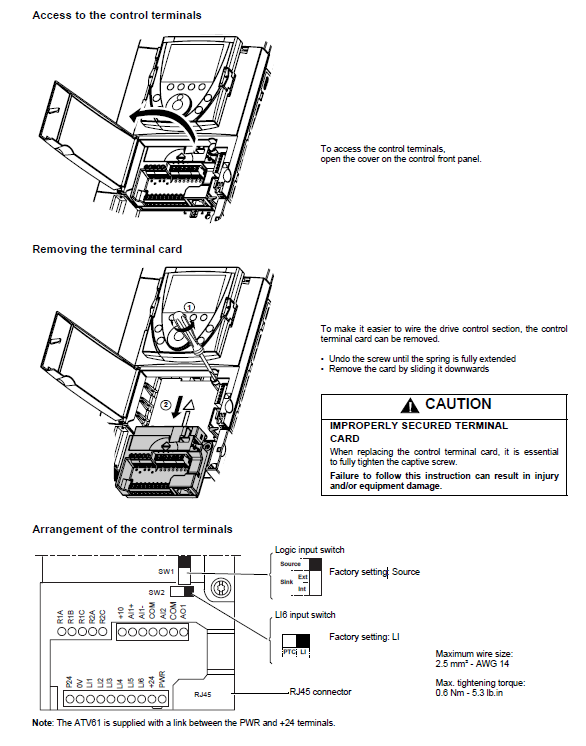
First, to get access to the control terminals, open the cover on the control front panel.
Undo the locking screw until the spring is full extended.
Remove the card by sliding it downwards.
Note the SW1 switch on the card.
Move the DIP switch accordingly.
Reseat the card back into its slot and re-tighten the locking screw.
Configuring Sink Mode on Altivar 61 & 71 Drives.
Product Line:
Altivar 61
Altivar 71
Environment:
All
Cause:
Terminal control mode configuration
Resolution:
First, to get access to the control terminals, open the cover on the control front panel.
Undo the locking screw until the spring is full extended.
Remove the card by sliding it downwards.
Note the SW1 switch on the card.
Move the DIP switch accordingly.
Reseat the card back into its slot and re-tighten the locking screw.
게시 대상: 슈나이더 일렉트릭 Korea

도움이 필요하신가요?
제품 선택기
애플리케이션에 적합한 제품과 액세서리를 빠르고 쉽게 찾을 수 있습니다.
견적 받기
영업 관련하여 온라인으로 문의하시면 전문가가 연락드립니다.
구매처
해당 지역의 가장 가까운 슈나이더 일렉트릭 대리점을 쉽게 찾을 수 있습니다.
지원 센터
한 곳에서 모든 요구 사항에 대한 지원 리소스를 찾아보십시오.