


Unable to establish communication in PME with Eaton93PM even when the webpage is accessible and the IP address pings OK
Issue
Unable to establish communication in PME with Eaton93PM even when the webpage is accessible and the IP address pings OK.
Product Line
Power Monitoring Expert third-party device type
Environment
PME communication with third-party devices
Cause
No communication to Eaton93PM in Power Monitoring Expert.
Resolution
Unable to establish communication in PME with Eaton93PM even when the webpage is accessible and the IP address pings OK.
Product Line
Power Monitoring Expert third-party device type
Environment
PME communication with third-party devices
Cause
No communication to Eaton93PM in Power Monitoring Expert.
Resolution
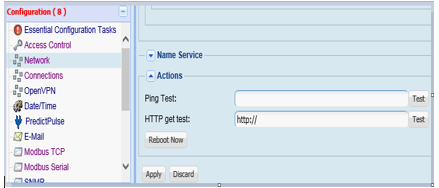
- Log in to the Eaton93PM, select the Network option from the left side and select Reboot Now as shown on the screen shot below just below the "HTTP get test"
- It will take about 2 minutes for the reboot to compete, PME will see the device as soon as the reboot completes