


Program Viewer web page for the BMENOC0311 returns the error 'Couldn't dynamic plc content'.
Issue
The Program Viewer web page for the BMENOC0311 Factorycast module returns the error 'Couldn't dynamic plc content'.
Product Line
BMENOC0311
Environment
Windows 10
Resolution
The Program Viewer web page for a BMENOC0311 Factorycast module returns the error 'Couldn't dynamic load plc content.
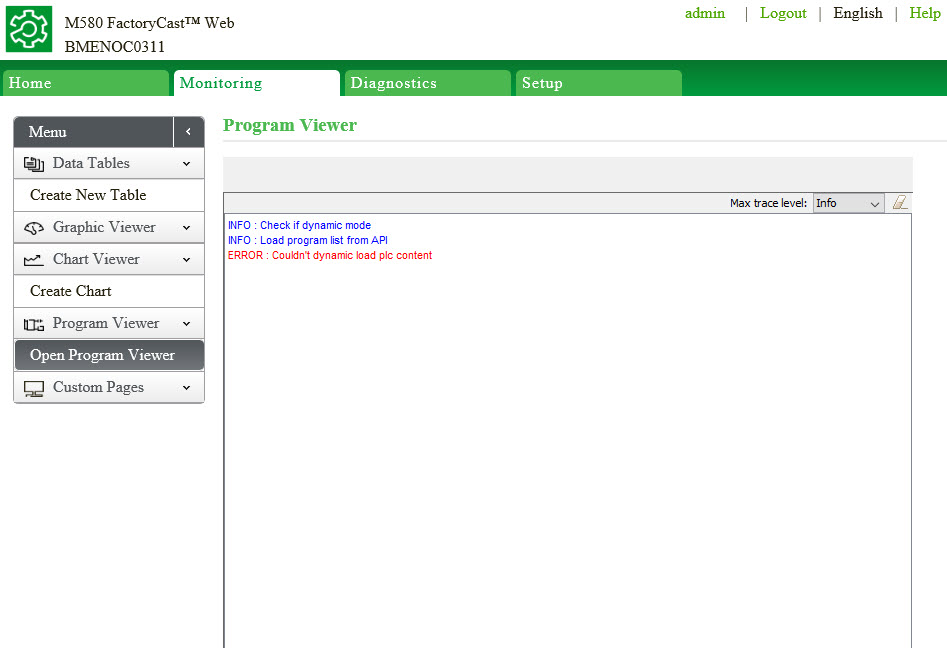
This will occur if the Unity application project settings is not configured for the Program Viewer.
To resolve the issue: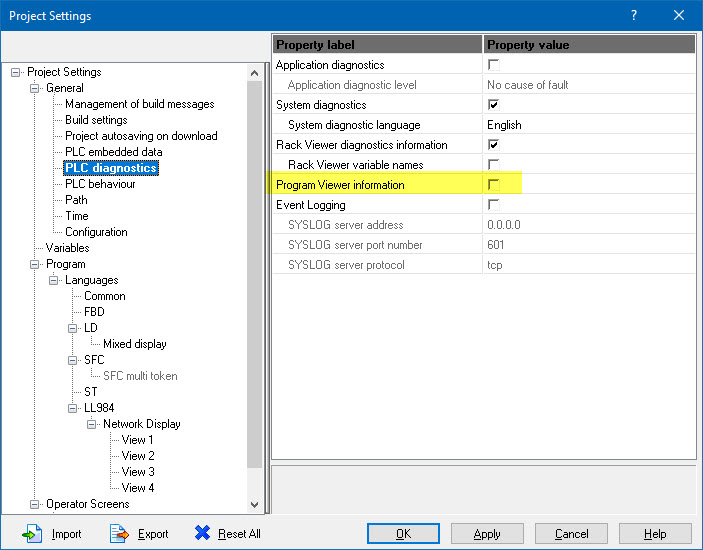
The Program Viewer web page for the BMENOC0311 Factorycast module returns the error 'Couldn't dynamic plc content'.
Product Line
BMENOC0311
Environment
Windows 10
Resolution
The Program Viewer web page for a BMENOC0311 Factorycast module returns the error 'Couldn't dynamic load plc content.
This will occur if the Unity application project settings is not configured for the Program Viewer.
To resolve the issue:
- Open the Project Settings for the Unity application.
- Click on 'PLC Diagnostics'
- Select the checkbox labeled 'Program Viewer Information'
- Click on 'Apply'.
- Click on 'OK'.