


PowerChute Network Shutdown VM priority groups explained
Issue:
What are the priority groups in the PowerChute Network Shutdown?
Product Line:
PowerChute Network Shutdown v4.3, v4.4.x, 5.x
Environment:
PowerChute Network Shutdown v4.3, v4.4, 5.x configured with VMware vCenter Server.
Cause:
Informational
Solution:
Virtual Machines, Virtual Appliances, and the vCenter Server Appliance can be grouped into priority groups - High, Medium, Low, Group 1, Group 2, and any remaining will be un-prioritized. When VM Prioritization is enabled, an inventory view of the datacenter, clusters, VMs and vApps appears on the left. The High, Medium, Low, Group 1, and Group 2 priority groups are listed on the right.
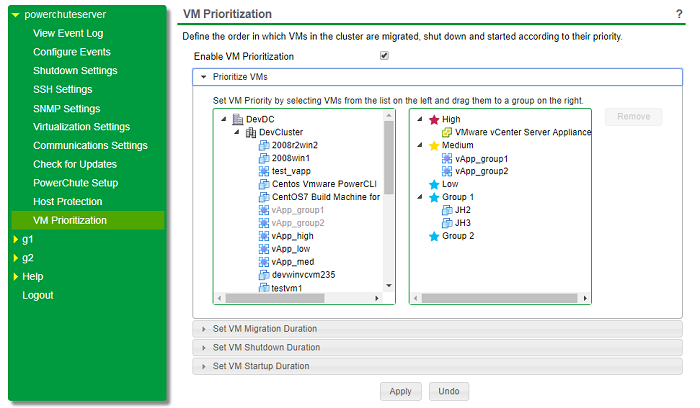
You can assign a VM/vApp to a priority group by clicking on a VM/vApp on the left-hand side and dragging it to a priority group on the right. You can select multiple VMs/vApps by pressing the CTRL key on the keyboard while clicking on the VMs/vApps you want to move. You can also click on the cluster icon to select all VMs within that cluster or click the datacenter icon to select all clusters of VMs/vApps.
Move VMs/vApps between priority groups by dragging them from one group to another. To remove a VM/vApp from a priority group, select the VM/vApp and click the Remove button.
Any VM/vApp in the inventory not assigned to a priority group is considered Un-prioritized.
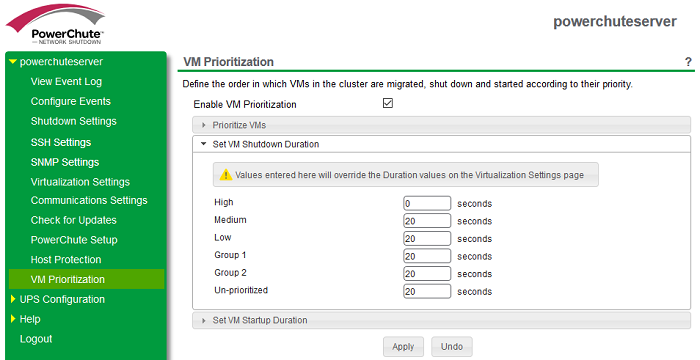
If, as in the example above, the High-priority group has a delay set to zero, any powered-on VMs/vApps included in the high-priority group will be skipped. The High-priority VMs/vApps will remain powered on. This may be helpful when working with VMs/vApps that need to stay running after the vCenter Server VM is shut down, e.g., Storage or Controller VMs. If these VMs/vApps require graceful shutdown, then an external script can be configured via the Shutdown Command file feature in PowerChute to do this. Please note that these VMs/vApps will not be powered up automatically by PowerChute if VM Startup has been enabled.
NOTE: Setting any priority group with a zero-second delay for Migration, Shutdown, and Startup will have the same effect.
Prioritized VM Operations Sequence:
For VM Migration and VM Startup, the order in which priority groups are processed is as follows:

High-priority VMs are Migrated and Started first, then Medium, and so on.
For VM Shutdown, the order in which priority groups are processed is:

Un-prioritized are shut down first, then Group 2, and so on.
What are the priority groups in the PowerChute Network Shutdown?
Product Line:
PowerChute Network Shutdown v4.3, v4.4.x, 5.x
Environment:
PowerChute Network Shutdown v4.3, v4.4, 5.x configured with VMware vCenter Server.
Cause:
Informational
Solution:
Virtual Machines, Virtual Appliances, and the vCenter Server Appliance can be grouped into priority groups - High, Medium, Low, Group 1, Group 2, and any remaining will be un-prioritized. When VM Prioritization is enabled, an inventory view of the datacenter, clusters, VMs and vApps appears on the left. The High, Medium, Low, Group 1, and Group 2 priority groups are listed on the right.
You can assign a VM/vApp to a priority group by clicking on a VM/vApp on the left-hand side and dragging it to a priority group on the right. You can select multiple VMs/vApps by pressing the CTRL key on the keyboard while clicking on the VMs/vApps you want to move. You can also click on the cluster icon to select all VMs within that cluster or click the datacenter icon to select all clusters of VMs/vApps.
Move VMs/vApps between priority groups by dragging them from one group to another. To remove a VM/vApp from a priority group, select the VM/vApp and click the Remove button.
Any VM/vApp in the inventory not assigned to a priority group is considered Un-prioritized.
If, as in the example above, the High-priority group has a delay set to zero, any powered-on VMs/vApps included in the high-priority group will be skipped. The High-priority VMs/vApps will remain powered on. This may be helpful when working with VMs/vApps that need to stay running after the vCenter Server VM is shut down, e.g., Storage or Controller VMs. If these VMs/vApps require graceful shutdown, then an external script can be configured via the Shutdown Command file feature in PowerChute to do this. Please note that these VMs/vApps will not be powered up automatically by PowerChute if VM Startup has been enabled.
NOTE: Setting any priority group with a zero-second delay for Migration, Shutdown, and Startup will have the same effect.
Prioritized VM Operations Sequence:
For VM Migration and VM Startup, the order in which priority groups are processed is as follows:
High-priority VMs are Migrated and Started first, then Medium, and so on.
For VM Shutdown, the order in which priority groups are processed is:
Un-prioritized are shut down first, then Group 2, and so on.