


How to activate the site Manager with EcoStruxure Operator Terminal Expert runtime
In EcoStruxure Operator Terminal Expert builtime
In order to include the SiteManager software in the HMI RunTime, do the following action:

Add the hardware configuration toolchest in one Panel
In EcoStruxure Operator Terminal Expert Runtime for Windows OS
Even when the SiteManager software is installed/preinstalled, it is not started by default at startup of Windows OS.
In order to start the SiteManager software, turn off the write filter (Windows OS EWF feature for filesystem protection), then click "All Programs ? Schneider-Electric, SiteManager Embedded, Start SiteManager Embedded" in Windows "Start" menu.
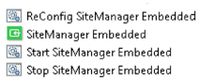
The SiteManager is then started. Since then, the SiteManager software is automatically started at startup of Windows OS.
In order to prevent the SiteManager software to start, turn off the write filter (Windows OS EWF feature for filesystem protection), then click "All Programs ? Schneider-Electric, SiteManager Embedded, Stop SiteManager Embedded" in Windows "Start" menu.
The SiteManager is then stopped. Since then, the SiteManager software is not started at startup of Windows OS.
In EcoStruxure Operator Terminal Expert runtime
In the "Hardware Configuration" page, in the "EcoStruxure Secure Connect Advisor" section:

In order to include the SiteManager software in the HMI RunTime, do the following action:
- In System Architecture, select the HMI target, then click on the "tab" Advanced and "Data Access" then select the icon "EcoStruxure Secure Connect Advisor", in Transfer Method
Add the hardware configuration toolchest in one Panel
In EcoStruxure Operator Terminal Expert Runtime for Windows OS
Even when the SiteManager software is installed/preinstalled, it is not started by default at startup of Windows OS.
In order to start the SiteManager software, turn off the write filter (Windows OS EWF feature for filesystem protection), then click "All Programs ? Schneider-Electric, SiteManager Embedded, Start SiteManager Embedded" in Windows "Start" menu.
The SiteManager is then started. Since then, the SiteManager software is automatically started at startup of Windows OS.
In order to prevent the SiteManager software to start, turn off the write filter (Windows OS EWF feature for filesystem protection), then click "All Programs ? Schneider-Electric, SiteManager Embedded, Stop SiteManager Embedded" in Windows "Start" menu.
The SiteManager is then stopped. Since then, the SiteManager software is not started at startup of Windows OS.
In EcoStruxure Operator Terminal Expert runtime
In the "Hardware Configuration" page, in the "EcoStruxure Secure Connect Advisor" section:
- In order to start the SiteManager software, click on button "Enable"
- In order to start the SiteManager software, click on button "Disable"