


How do you diagnose the cause of "DIS" error on Lexium32 drives?
Issue:
Diagnose the cause of "DIS" error on Lexium32 drives
Product Line:
LXM32
Resolution:
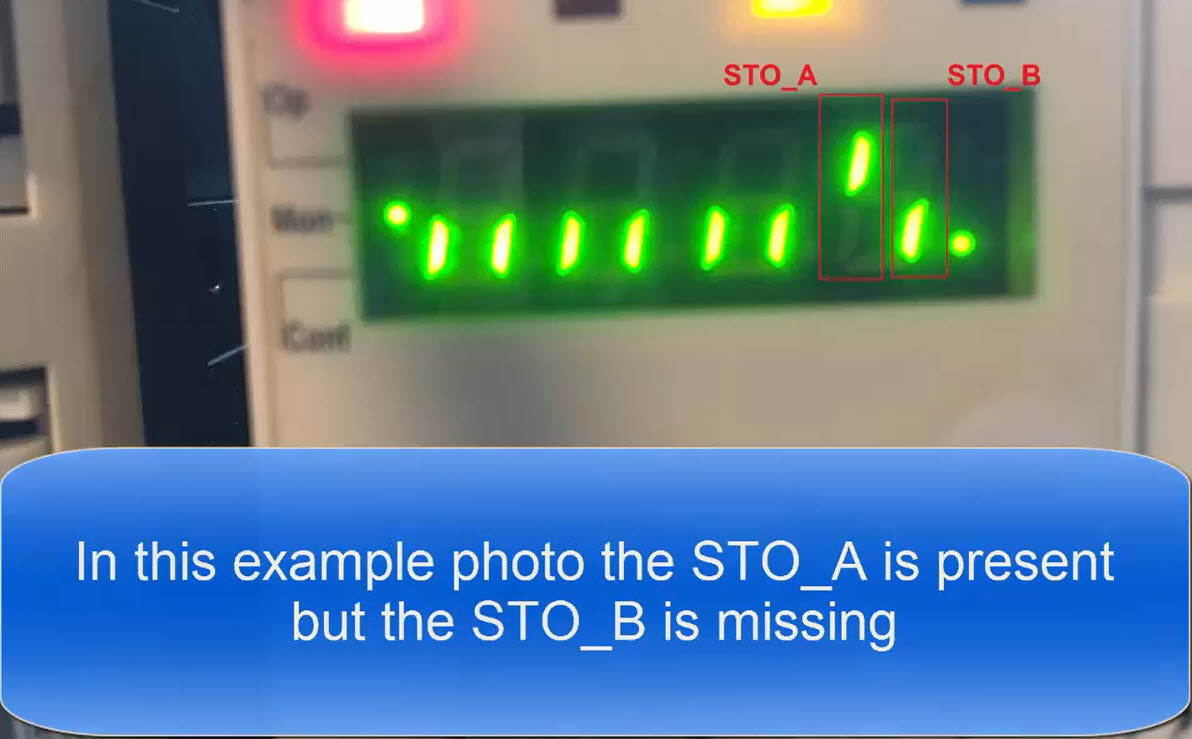
1- First, check to see if the STO_A and/or STO_B inputs are active. This is done by reading the parameter "Sto" via the built-in HMI. Navigate to NON > STO and then view the status of the Safety inputs
2- Second, verify that the drive is not missing the main AC voltage or if the drive is operating from 3 phase mains that one of the mains phases is not missing. This is done by reading the parameter "udca" via the built-in HMI. Navigate to NON > udcA and view the actual DC bus voltage level. The DC bus voltage must be approximately in the range of the values seen in the attached PDF document. The document lists the nominal DC bus voltages for LXM32 drives based on the incoming mains supply voltage.
If this FAQ did not solve your issue, you can chat with us at chat with us or e-mail us at customer.services@se.com to create a case with our Technical Support Team.
If you are not located in North America, please contact your local Customer Care Center for assistance:
Support | Schneider Electric Global (se.com)
Diagnose the cause of "DIS" error on Lexium32 drives
Product Line:
LXM32
Resolution:
1- First, check to see if the STO_A and/or STO_B inputs are active. This is done by reading the parameter "Sto" via the built-in HMI. Navigate to NON > STO and then view the status of the Safety inputs
2- Second, verify that the drive is not missing the main AC voltage or if the drive is operating from 3 phase mains that one of the mains phases is not missing. This is done by reading the parameter "udca" via the built-in HMI. Navigate to NON > udcA and view the actual DC bus voltage level. The DC bus voltage must be approximately in the range of the values seen in the attached PDF document. The document lists the nominal DC bus voltages for LXM32 drives based on the incoming mains supply voltage.
If this FAQ did not solve your issue, you can chat with us at chat with us or e-mail us at customer.services@se.com to create a case with our Technical Support Team.
If you are not located in North America, please contact your local Customer Care Center for assistance:
Support | Schneider Electric Global (se.com)