


How can the BMEP58_ECPU_EXT Device DDT for M580 HSBY be used to diagnose the communication?
Issue
A Control Expert application with M580 PLCs creates the BMEP58_ECPU_EXT Device DDT that is an array of WORD and BOOL variables with information about the CPU Ethernet status. One of the variables is the "Port Link" with the status of Link up/down, but it does not have a clear description to show which value is for Link up/down.
Product Line
EcoStruxure Control Expert (formerly Unity Pro), M580 HSBY
Environment
Control Expert v14.0, BMEH586040 v2.80
Resolution
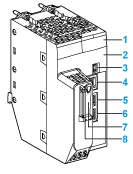
The BMEP58_ECPU_EXT has a bit for each port of the CPU where 1 indicates Link up and 0 indicates Link down. Below you may find the variable and the correspondent physical port:
BMEP58_ECPU_EXT.PORT1_LINK: Ethernet service port
BMEP58_ECPU_EXT.PORT2_LINK: Upper dual port
BMEP58_ECPU_EXT.PORT3_LINK: Bottom dual port
A Control Expert application with M580 PLCs creates the BMEP58_ECPU_EXT Device DDT that is an array of WORD and BOOL variables with information about the CPU Ethernet status. One of the variables is the "Port Link" with the status of Link up/down, but it does not have a clear description to show which value is for Link up/down.
Product Line
EcoStruxure Control Expert (formerly Unity Pro), M580 HSBY
Environment
Control Expert v14.0, BMEH586040 v2.80
Resolution
The BMEP58_ECPU_EXT has a bit for each port of the CPU where 1 indicates Link up and 0 indicates Link down. Below you may find the variable and the correspondent physical port:
BMEP58_ECPU_EXT.PORT1_LINK: Ethernet service port
BMEP58_ECPU_EXT.PORT2_LINK: Upper dual port
BMEP58_ECPU_EXT.PORT3_LINK: Bottom dual port