


Is possible to open more than one simulator of Control Expert with RDP?
Issue
The Floating License of Control Expert v14.0 allows Remote Desktop Connections (RDP) up to the number of seats available in the Control Expert license and RDP of Windows. The default configuration of the Control Expert simulator does not allow to simulate in more than one RDP connections if the user uses the default configuration of the simulator.
Product Line
Control Expert
Environment
Control Expert v14.0, Windows Server 2016
Resolution
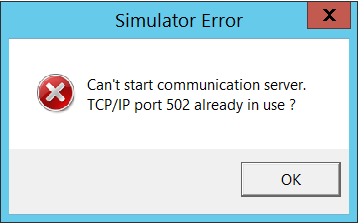
The Control Expert simulator uses a connection to the Local Host PC on the default port 502 (Schneider Port) if the user uses the default configuration of the simulator and try to open more than one simulator, the message bellow shows.
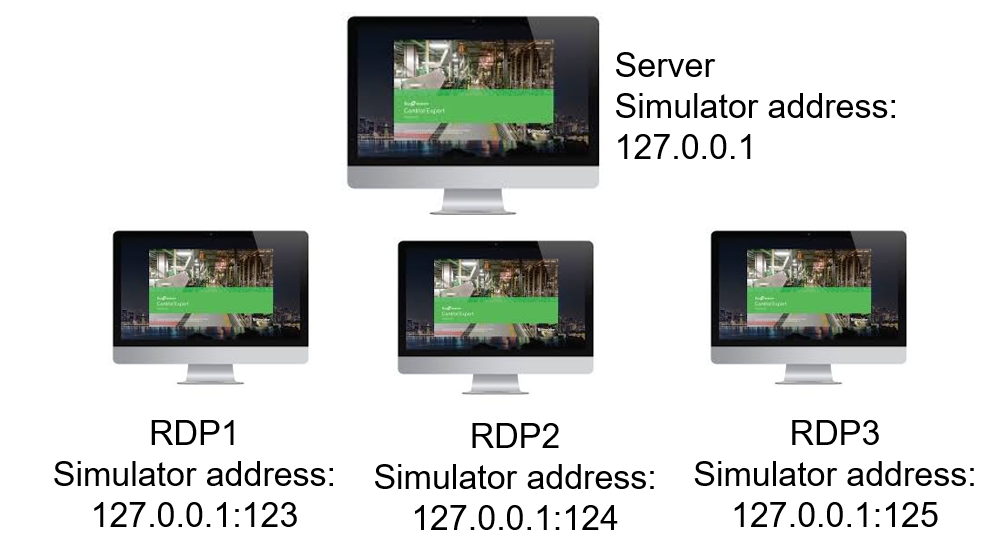
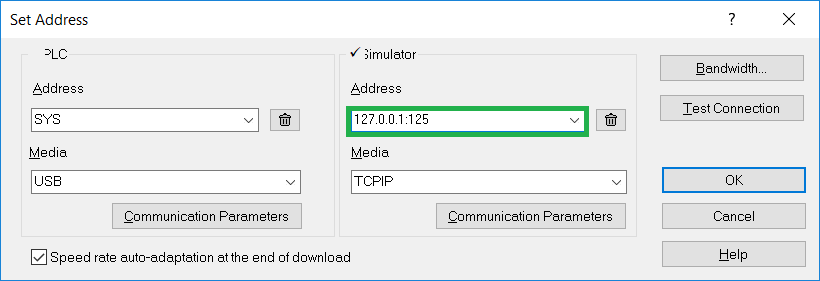
The reason for it is that the simulator allows one connection per port and the user needs to choose an optional port number per simulator that wants to run. In this case, then select the Control Expert menu command PLC-> Set Address, and in the Simulator text box Address enter the optional port number of the target PC. The architecture below shows the configuration for 3 RDPs.
P.S.: The ports above are examples and the user can choose another port available on the computer.
The Floating License of Control Expert v14.0 allows Remote Desktop Connections (RDP) up to the number of seats available in the Control Expert license and RDP of Windows. The default configuration of the Control Expert simulator does not allow to simulate in more than one RDP connections if the user uses the default configuration of the simulator.
Product Line
Control Expert
Environment
Control Expert v14.0, Windows Server 2016
Resolution
The Control Expert simulator uses a connection to the Local Host PC on the default port 502 (Schneider Port) if the user uses the default configuration of the simulator and try to open more than one simulator, the message bellow shows.
The reason for it is that the simulator allows one connection per port and the user needs to choose an optional port number per simulator that wants to run. In this case, then select the Control Expert menu command PLC-> Set Address, and in the Simulator text box Address enter the optional port number of the target PC. The architecture below shows the configuration for 3 RDPs.
P.S.: The ports above are examples and the user can choose another port available on the computer.