


EcoStruxure Operator Terminal Expert - How do I set up a custom image or logo during bootup on my HMI?
Issue
During the bootup sequence of my HMI that is configured with EcoStruxure Operator Terminal Expert, I'd like to see my company logo image. How do I configure it?
Product Line
EcoStruxure Operator Terminal Expert v3.1 or higher
Environment
HMI Programming Software in Windows
Resolution
The HMI boot screen image can be changed to show a .PNG file format image.
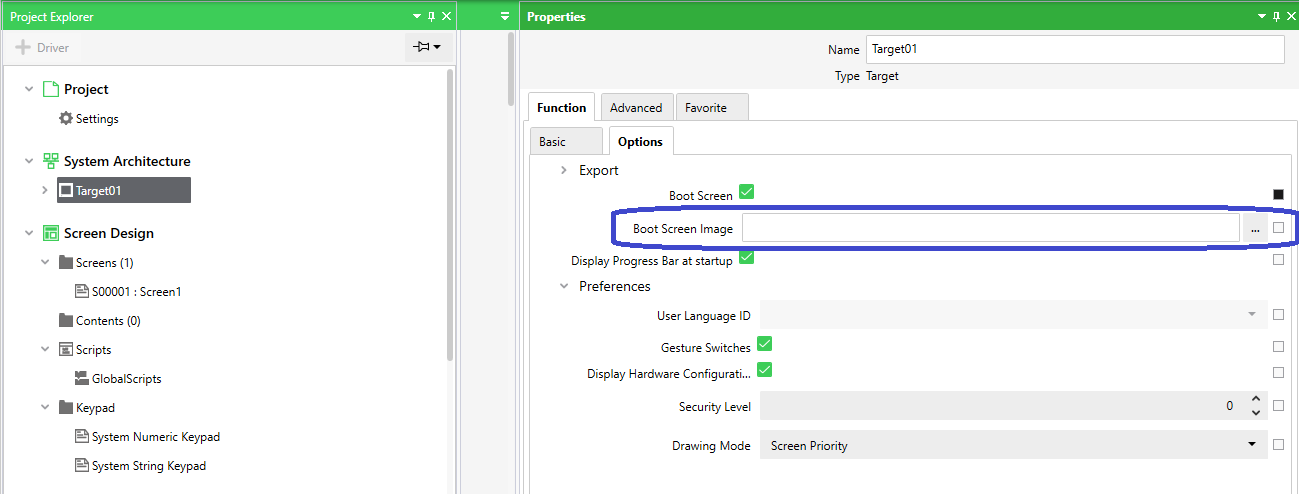
In EcoStruxure Operator Terminal Expert Configuration Software, the Boot Screen Image may be customized by following these steps:
1) Under Project Explorer, expand "System Architecture"
2) Double-click on "Target01"- On the far right side of your screen, you will see the Properties screen appear
3) Click on the Function tab
4) Click on the Options Tab
5) Next to "Boot Screen Image", click the [...] button
6) From your Windows File System, choose an image file of .PNG format.
During the bootup sequence of my HMI that is configured with EcoStruxure Operator Terminal Expert, I'd like to see my company logo image. How do I configure it?
Product Line
EcoStruxure Operator Terminal Expert v3.1 or higher
Environment
HMI Programming Software in Windows
Resolution
The HMI boot screen image can be changed to show a .PNG file format image.
In EcoStruxure Operator Terminal Expert Configuration Software, the Boot Screen Image may be customized by following these steps:
1) Under Project Explorer, expand "System Architecture"
2) Double-click on "Target01"- On the far right side of your screen, you will see the Properties screen appear
3) Click on the Function tab
4) Click on the Options Tab
5) Next to "Boot Screen Image", click the [...] button
6) From your Windows File System, choose an image file of .PNG format.