


ATV630 Multidrive Booster Control, Runtime Pump Cycling Mode
Issue:
When using the ATV630 Pump Booster Control Multidrive function with runtime pump cycling, why is the pump with the lowest motor runtime not starting first?
Product Line:
ATV630, Altivar 600
Environment:
All
Cause:
NA
Resolution:
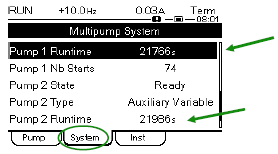
Motor runtime is not used to cycle the pumps, it is the pump runtime. The pump runtime is found in the Display Menu under Pump Parameters and then selecting the System tab.
When the ATV630 Multidrive Booster Control function is used for pumping applications, a [Pump Cycling Mode] parameter is available to allow for changing of the start order for up to six pumps to help manage ware. The factory setting for this parameter is [Runtime], where the available pump with the lowest running time is started first and the running pump with the highest running time is stopped first.
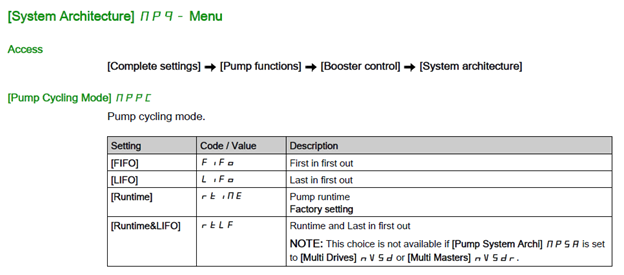
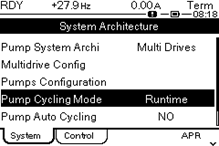
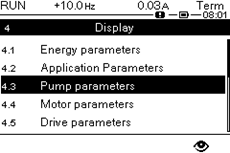
To view the motor and pump runtimes with the drive keypad, go to the [Display] menu and then the [Pump Parameters] menu.
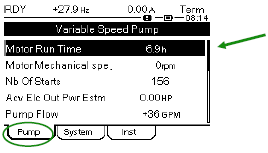
The Motor Run Time is displayed under the Pump tab, this is not the run time used to cycle the pumps.
Select the System tab to view the Pump Runtime, this is the runtime used to cycle the pumps. All pump runtimes will be displayed here.
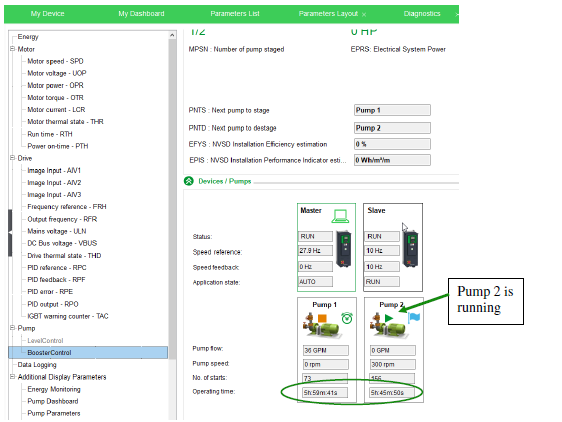
When connected with the SoMove drive configuration software, the runtime for all pumps can also be viewed under Booster Control on the Parameters Layout page.
When using the ATV630 Pump Booster Control Multidrive function with runtime pump cycling, why is the pump with the lowest motor runtime not starting first?
Product Line:
ATV630, Altivar 600
Environment:
All
Cause:
NA
Resolution:
Motor runtime is not used to cycle the pumps, it is the pump runtime. The pump runtime is found in the Display Menu under Pump Parameters and then selecting the System tab.
When the ATV630 Multidrive Booster Control function is used for pumping applications, a [Pump Cycling Mode] parameter is available to allow for changing of the start order for up to six pumps to help manage ware. The factory setting for this parameter is [Runtime], where the available pump with the lowest running time is started first and the running pump with the highest running time is stopped first.
To view the motor and pump runtimes with the drive keypad, go to the [Display] menu and then the [Pump Parameters] menu.
The Motor Run Time is displayed under the Pump tab, this is not the run time used to cycle the pumps.
Select the System tab to view the Pump Runtime, this is the runtime used to cycle the pumps. All pump runtimes will be displayed here.
When connected with the SoMove drive configuration software, the runtime for all pumps can also be viewed under Booster Control on the Parameters Layout page.