


How to increase the update rate for the Position Actual Value on Lexium 28 with CANopen
Issue
I want to increase the update rate of CANopen PDOs including the Position Actual Value on a Lexium 28 from the default 100ms.
Product Line
Lexium 28 with CANopen
EcoStruxure Machine Expert
Environment
PLC Programming software in Windows - Logic Builder
Resolution
Prerequisite:
The PDO parameters Statusword and Position Actual Value are both enabled with the checkbox in the Transmit PDOs:
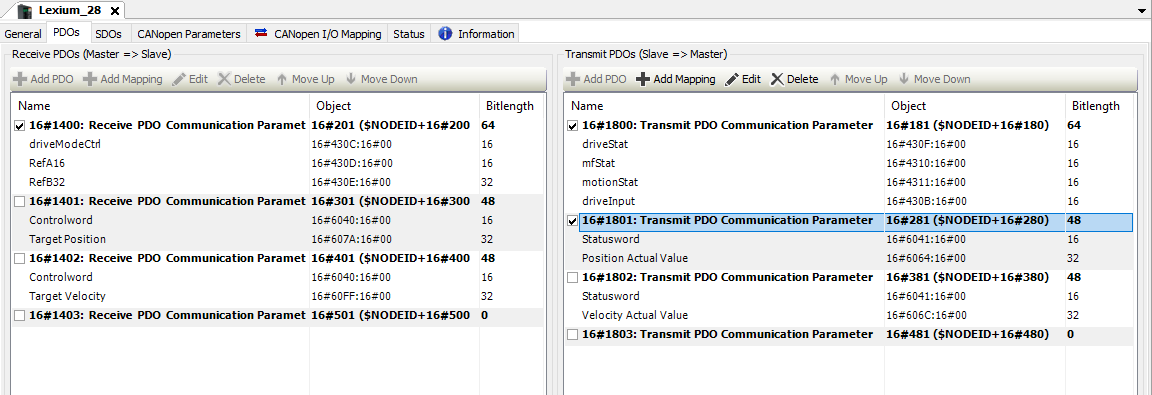
To increase the update rate of the CANopen Positional Actual Value on a Lexium 28, follow these steps:
1) In the EcoStruxure Machine Expert Logic Builder, go to the Devices Tree
2) Expand the CANopen bus -> CANopen_Performance nodes to find the Lexium_28 device node
3) Double-click on the Lexium_28 node you wish to edit
4) Click on the CANopen Parameters tab
5) Scroll down to the PDOs -> TxPDOs ->
6) Expand TxPDOs -> available TxPDOs -> PDO 16#1801 -> PDO 16#1801 -> available PDO-Parameter
The sending of the Position Actual Value" TxPDO from the Lexium, by default is every 100ms by internal timer here.
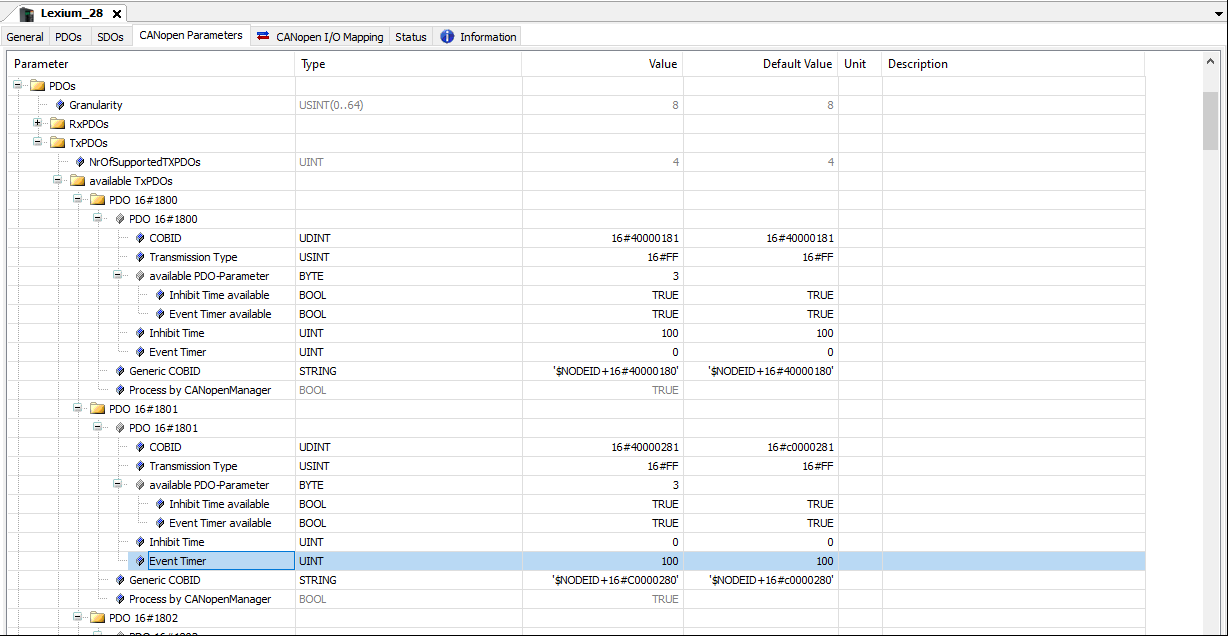
7) Set the Event Timer to your desired transmit time from the Lexium 28
NOTE: Practically, 15ms is the fastest value for the Lexium 28
Optional
If you need these status variables faster than 100ms:
driveStat
mfStat
motionStat
driveInput
1) Expand TxPDOs-> available TxPDOs -> PDO 16#1800 -> PDO 16#1800 -> available PDO-Parameter
2) Set the Inhibit Time to 20ms
Event Timer is the set interval time you wish a TxPDO to be transmitted at from the Lexium (or other CANopen device)
Inhibit Time prevents sending of a TxPDO message regardless of the Event Timer Time. Useful for if you've already set an Event Timer time and you're tuning for network bandwidth if you have many drives or I/O.
I want to increase the update rate of CANopen PDOs including the Position Actual Value on a Lexium 28 from the default 100ms.
Product Line
Lexium 28 with CANopen
EcoStruxure Machine Expert
Environment
PLC Programming software in Windows - Logic Builder
Resolution
Prerequisite:
The PDO parameters Statusword and Position Actual Value are both enabled with the checkbox in the Transmit PDOs:
To increase the update rate of the CANopen Positional Actual Value on a Lexium 28, follow these steps:
1) In the EcoStruxure Machine Expert Logic Builder, go to the Devices Tree
2) Expand the CANopen bus -> CANopen_Performance nodes to find the Lexium_28 device node
3) Double-click on the Lexium_28 node you wish to edit
4) Click on the CANopen Parameters tab
5) Scroll down to the PDOs -> TxPDOs ->
6) Expand TxPDOs -> available TxPDOs -> PDO 16#1801 -> PDO 16#1801 -> available PDO-Parameter
The sending of the Position Actual Value" TxPDO from the Lexium, by default is every 100ms by internal timer here.
7) Set the Event Timer to your desired transmit time from the Lexium 28
NOTE: Practically, 15ms is the fastest value for the Lexium 28
Optional
If you need these status variables faster than 100ms:
driveStat
mfStat
motionStat
driveInput
1) Expand TxPDOs-> available TxPDOs -> PDO 16#1800 -> PDO 16#1800 -> available PDO-Parameter
2) Set the Inhibit Time to 20ms
Event Timer is the set interval time you wish a TxPDO to be transmitted at from the Lexium (or other CANopen device)
Inhibit Time prevents sending of a TxPDO message regardless of the Event Timer Time. Useful for if you've already set an Event Timer time and you're tuning for network bandwidth if you have many drives or I/O.