


MiCOM P343 - Differential & bias current measurement missing
Issue
In one of our installed MICOM P343 relay, Generator low impedance differential protection is enabled and protection is working fine however the differential & bias current measurement is not showing up in MEASUREMENT 3 folder. As per manual it should be available in Measurement 3 folder.
_____________________________________________________________
Product Line
MiCOM P343 Firmware version 35
_____________________________________________________________
Environment
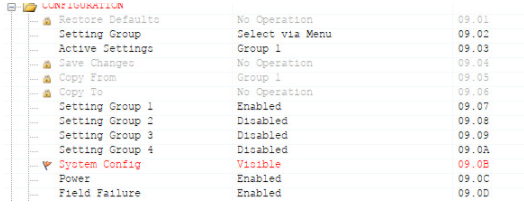
Parameter "System config" [09.0B] value is set as invisible.
_____________________________________________________________
Solution
Issue can be resolved by either making visible the "System config" parameter or by upgrading the device to FW version 36. There is no harm in keeping the "System config" as invisible.
To upgrade the device please reach to local SE contact.
_____________________________________________________________
*Warning: Installation, maintenance, up-gradation, down-gradation of MiCOM device should only be performed by qualified, competent personnel that have appropriate training and experience. Failure to follow the instructions / warnings in the Installation / Operation Guide can result in unwanted disruption to the power system, permanent damage to the device, severe injury or death.*
In one of our installed MICOM P343 relay, Generator low impedance differential protection is enabled and protection is working fine however the differential & bias current measurement is not showing up in MEASUREMENT 3 folder. As per manual it should be available in Measurement 3 folder.
_____________________________________________________________
Product Line
MiCOM P343 Firmware version 35
_____________________________________________________________
Environment
Parameter "System config" [09.0B] value is set as invisible.
_____________________________________________________________
Solution
Issue can be resolved by either making visible the "System config" parameter or by upgrading the device to FW version 36. There is no harm in keeping the "System config" as invisible.
To upgrade the device please reach to local SE contact.
_____________________________________________________________
*Warning: Installation, maintenance, up-gradation, down-gradation of MiCOM device should only be performed by qualified, competent personnel that have appropriate training and experience. Failure to follow the instructions / warnings in the Installation / Operation Guide can result in unwanted disruption to the power system, permanent damage to the device, severe injury or death.*