


How to setup syslog of TCSESM switch ?
Issue
How to setup syslog of TCSESM switch ?
Product line Envirovment
TCSESM switches
Environment
Windows 10 64 bits ,Windows Server 2019 64 bits
Resolution
Select the Diagnostics:Syslog dialog.
Activate the syslog function in the “Operation” frame.
Click on “Create”
In the “IP Address” column, enter the IP address of the syslog server
to which the log entries should be sent.
In the “Port” column, enter the UDP port of the syslog server at which
the syslog receives log entries. The default setting is 514.
In the “Minimum level to report” column, you enter the minimum level
of seriousness an event must attain for the device to send a log entry
to this syslog server.
In the “Active” column, you select the syslog servers that the device
takes into account when it is sending logs.
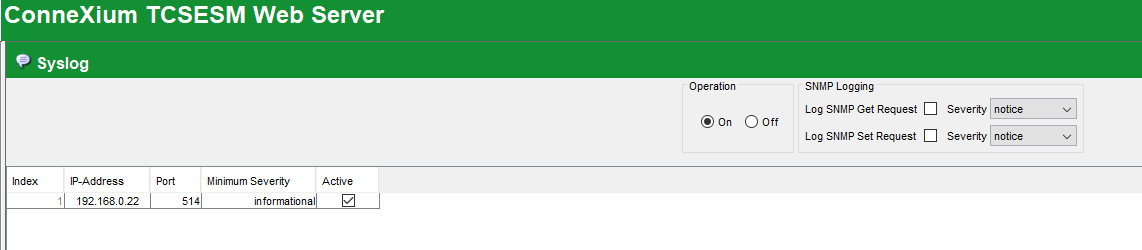
User could see the syslog events in syslog servers once new events are triggered in switch.

How to setup syslog of TCSESM switch ?
Product line Envirovment
TCSESM switches
Environment
Windows 10 64 bits ,Windows Server 2019 64 bits
Resolution
Select the Diagnostics:Syslog dialog.
Activate the syslog function in the “Operation” frame.
Click on “Create”
In the “IP Address” column, enter the IP address of the syslog server
to which the log entries should be sent.
In the “Port” column, enter the UDP port of the syslog server at which
the syslog receives log entries. The default setting is 514.
In the “Minimum level to report” column, you enter the minimum level
of seriousness an event must attain for the device to send a log entry
to this syslog server.
In the “Active” column, you select the syslog servers that the device
takes into account when it is sending logs.
User could see the syslog events in syslog servers once new events are triggered in switch.