


UPS firmware file transfer using Network Management Card web interface fails
Issue: UPS firmware file transfer using the Network Management Card (NMC) web interface fails
Product Line:
Cause: When performing the UPS firmware update using the NMC web interface, while connected to the web interface over WI-FI, a different network, or VPN, a file transfer timeout may occur if an HTTPS connection is used.
Resolution:
Option 1 (RECOMMENDED): The transfer timeout will not occur if the firmware transfer is performed over an SCP connection. Follow the steps outlined in FAQ000242942 to update the UPS firmware remotely using SCP and command line interface.
Option 2: The transfer timeout will not occur if the firmware transfer is performed over an HTTP connection, but this is not recommended due to lack of encryption.
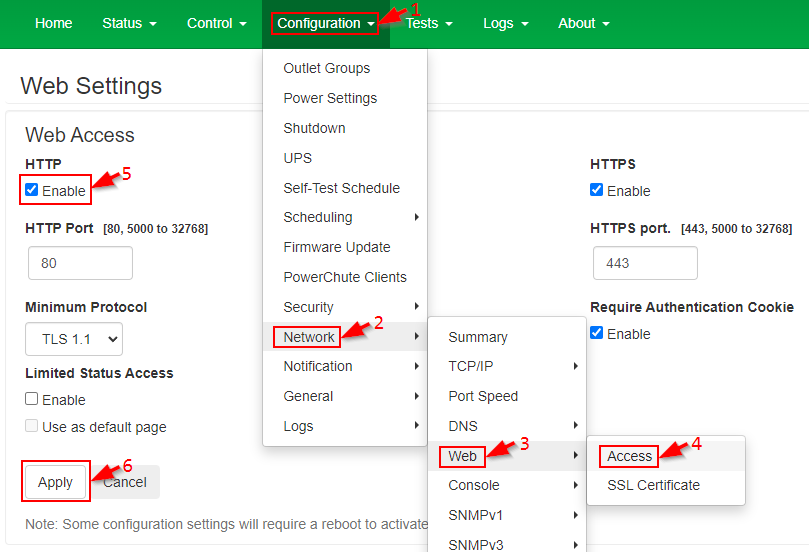
Step 1: In the web interface of the NMC, enable HTTP in "Configuration", "Network", "Web", "Access", and select "Apply":
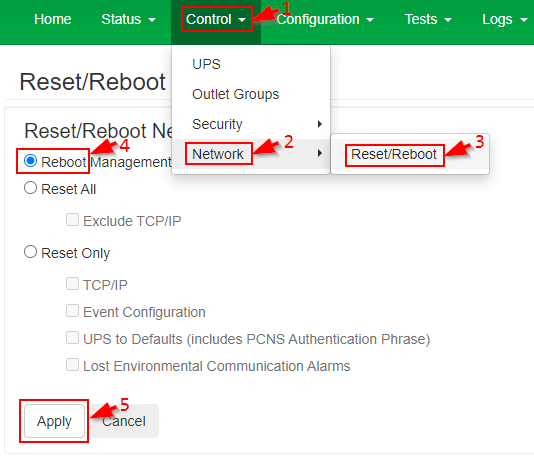
Step 2: Reboot the NMC. This will not affect the load connected to the UPS.
Enable "Reboot Management Interface" in Navigate to "Control", "Network", "Reset/Reboot", and select "Apply":
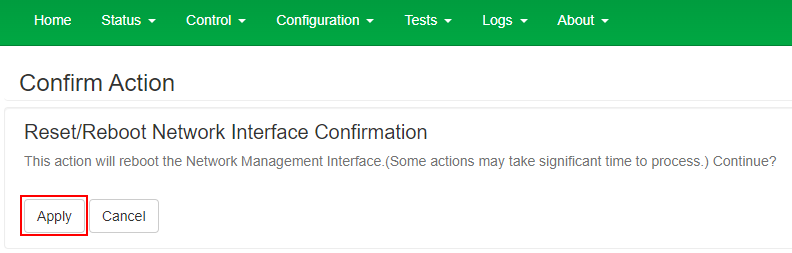
Confirm the reboot:
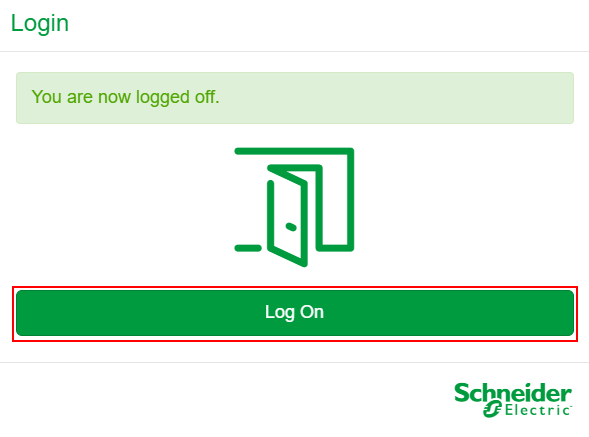
You will be logged off. Select Log On:
Step 3: Click the URL and manually change https to http. Press Enter.
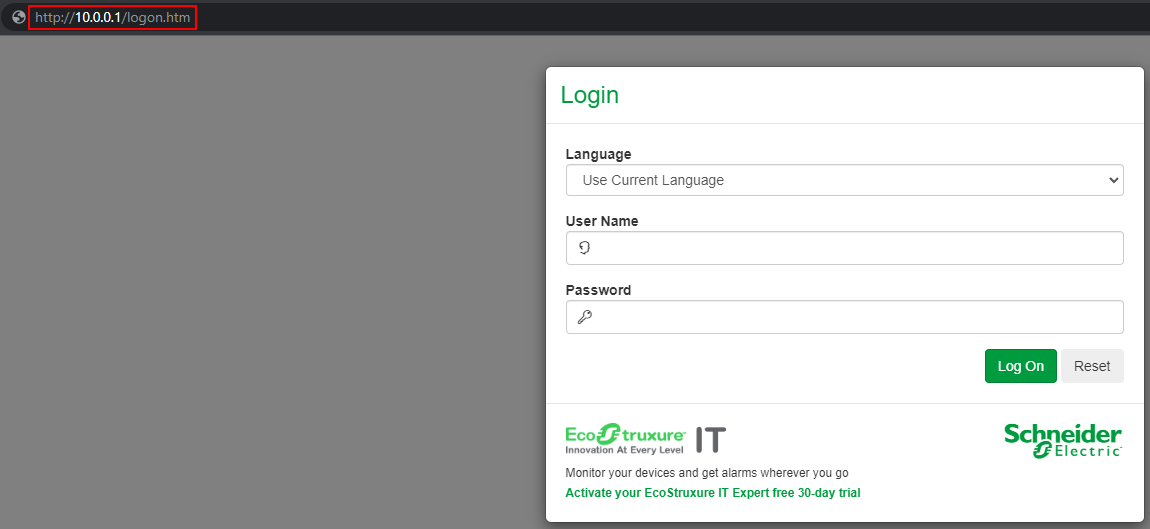
Step 4: Log in using your user name and password. Follow the steps outlined in FA170679 to update the firmware of your UPS.
Step 5: Once the firmware update has completed, HTTP access can now be disabled. Deselect HTTP in "Configuration", "Network", "Web", "Access", and select "Apply".
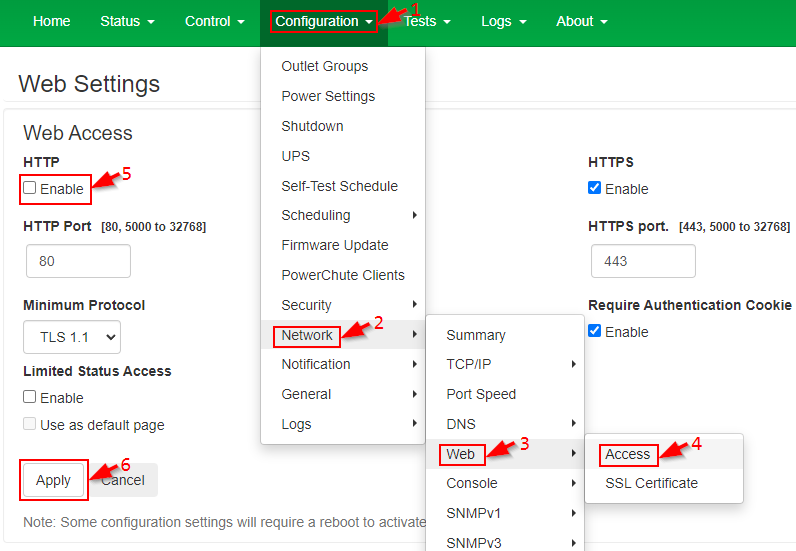
Step 6: Refer to Step 2 to reboot the NMC.
Product Line:
- Smart-UPS models with a SmartSlot or embedded NMC.
- UPS systems with Network Management Card 2 (AP9630, AP9630CH, AP9631, AP9631CH, or embedded NMC2) firmware v.6.8.0 or higher:
- UPS systems with Network Management Card 3 (AP9640, AP9641, AP9643, or embedded NMC3)
Cause: When performing the UPS firmware update using the NMC web interface, while connected to the web interface over WI-FI, a different network, or VPN, a file transfer timeout may occur if an HTTPS connection is used.
Resolution:
Option 1 (RECOMMENDED): The transfer timeout will not occur if the firmware transfer is performed over an SCP connection. Follow the steps outlined in FAQ000242942 to update the UPS firmware remotely using SCP and command line interface.
Option 2: The transfer timeout will not occur if the firmware transfer is performed over an HTTP connection, but this is not recommended due to lack of encryption.
Step 1: In the web interface of the NMC, enable HTTP in "Configuration", "Network", "Web", "Access", and select "Apply":
Step 2: Reboot the NMC. This will not affect the load connected to the UPS.
Enable "Reboot Management Interface" in Navigate to "Control", "Network", "Reset/Reboot", and select "Apply":
Confirm the reboot:
You will be logged off. Select Log On:
Step 3: Click the URL and manually change https to http. Press Enter.
Step 4: Log in using your user name and password. Follow the steps outlined in FA170679 to update the firmware of your UPS.
Step 5: Once the firmware update has completed, HTTP access can now be disabled. Deselect HTTP in "Configuration", "Network", "Web", "Access", and select "Apply".
Step 6: Refer to Step 2 to reboot the NMC.