


Geo SCADA: Legacy Protocol switch in Configure Connections dialog
Starting with Geo SCADA Expert 2020, a new, more secure protocol is used for client connections. This new protocol is enabled by default.
If a Geo SCADA 2020 (or newer) ViewX client wishes to connect to a Geo SCADA server older than Geo SCADA Expert 2020, however, this setting should be changed in the Configure Connections dialog to allow the ViewX client to run the legacy protocol (thus allowing connection to the older Geo SCADA server – which does not support this new protocol).
Follow the steps below to set this switch accordingly:
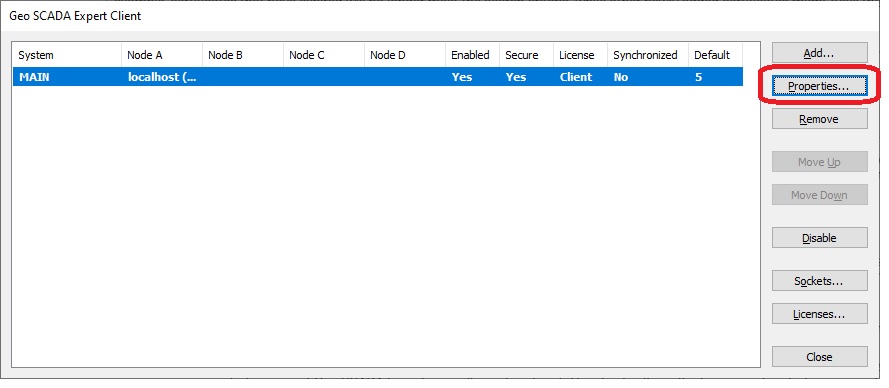 2. Select the connection from the list and click the ‘Properties’ button. This will bring up the Geo SCADA Expert Client Configuration dialog
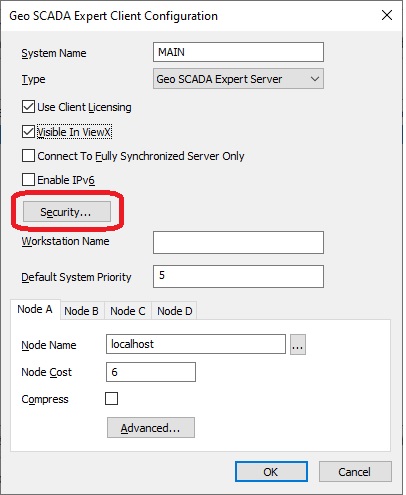
3. Click the ‘Security’ button. This will bring up the Connection Security dialog
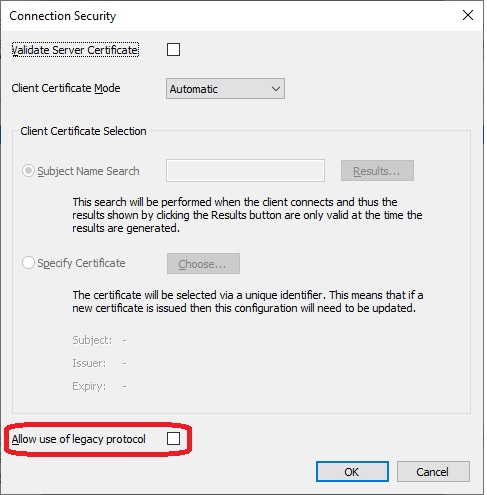
4. The ‘Allow use of legacy protocol’ checkbox is located at the bottom of the dialog
Leave this box unchecked if connecting ViewX to a Geo SCADA 2020 or newer server.
Check this box if connecting ViewX to a Geo SCADA 2019 or older server.
Note: use the Geo SCADA and ClearSCADA Version Compatibility Matrix (see link below) to determine if your ViewX client is compatible with the ClearSCADA/Geo SCADA server that you wish to connect to.
https://community.se.com/t5/Geo-SCADA-Knowledge-Base/Geo-SCADA-and-ClearSCADA-Version-Compatibility-Matrix/ba-p/278389
If a Geo SCADA 2020 (or newer) ViewX client wishes to connect to a Geo SCADA server older than Geo SCADA Expert 2020, however, this setting should be changed in the Configure Connections dialog to allow the ViewX client to run the legacy protocol (thus allowing connection to the older Geo SCADA server – which does not support this new protocol).
Follow the steps below to set this switch accordingly:
1. Open the EcoStruxure Geo SCADA Configure Connections dialog
3. Click the ‘Security’ button. This will bring up the Connection Security dialog
4. The ‘Allow use of legacy protocol’ checkbox is located at the bottom of the dialog
Leave this box unchecked if connecting ViewX to a Geo SCADA 2020 or newer server.
Check this box if connecting ViewX to a Geo SCADA 2019 or older server.
Note: use the Geo SCADA and ClearSCADA Version Compatibility Matrix (see link below) to determine if your ViewX client is compatible with the ClearSCADA/Geo SCADA server that you wish to connect to.
https://community.se.com/t5/Geo-SCADA-Knowledge-Base/Geo-SCADA-and-ClearSCADA-Version-Compatibility-Matrix/ba-p/278389