


How in RemoteConnecct or x70 Logic Editor to update the Logic Library e.g. LibSet V11.1 to LibSet V15.1?
If RemoteConnect project was created with older version then Logic Library must be updated.
Here are the steps for library update from RemoteConnect:
1. Open project in RemoteConnect and then open x70 Ladder Editor
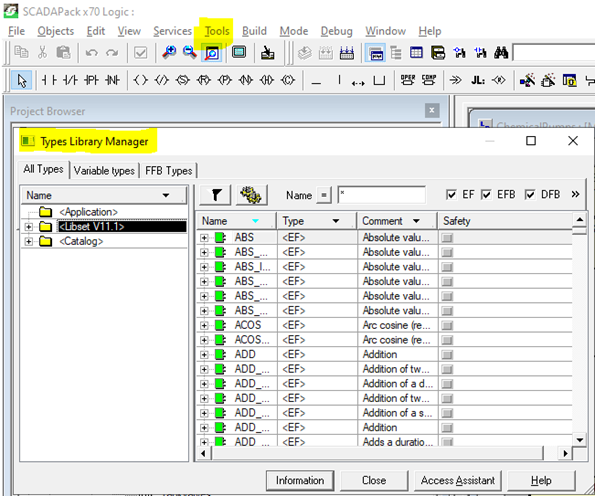
2. Select "Tools" and then "" and observe <LibSet V11.1>
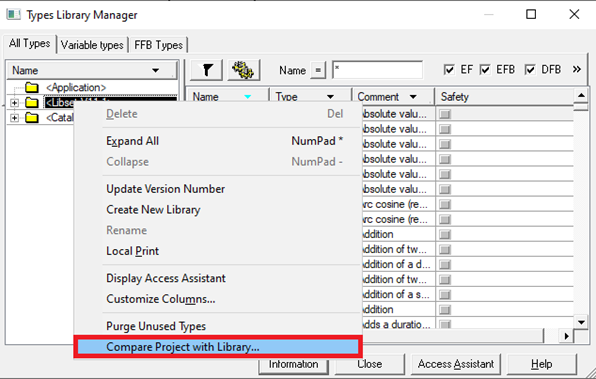
3. Right click on "LibSet" and then "Compare Project with Library ...!
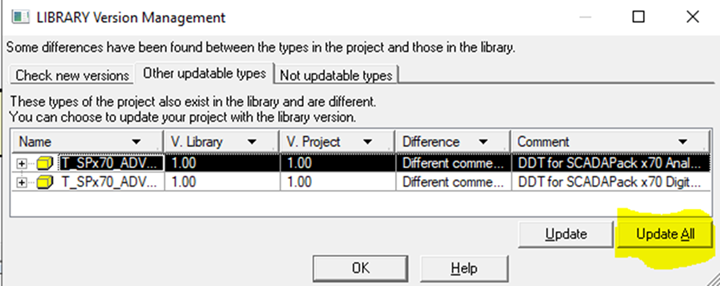
4. In "LIBRARY Version Management: select "Update All" and then follow the steps.
5. Update and build the project
6. Close and open the RemoteConnect project.
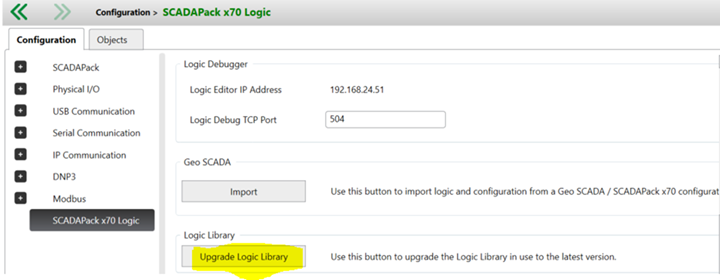
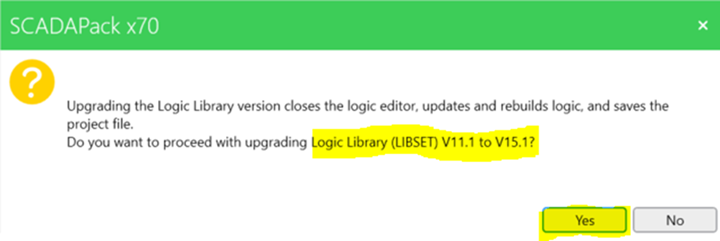
7. Click on Update Logic Library and then YES to proceed with upgrading LibSet V11.1 to V15.1
8. Verify that now when Types Library Manager LibSet is V15.1
Here are the steps for library update from RemoteConnect:
1. Open project in RemoteConnect and then open x70 Ladder Editor
2. Select "Tools" and then "" and observe <LibSet V11.1>
3. Right click on "LibSet" and then "Compare Project with Library ...!
4. In "LIBRARY Version Management: select "Update All" and then follow the steps.
5. Update and build the project
6. Close and open the RemoteConnect project.
7. Click on Update Logic Library and then YES to proceed with upgrading LibSet V11.1 to V15.1
8. Verify that now when Types Library Manager LibSet is V15.1