


How to install TCP Open V4.0 dans Libset CEV15.0?
Context
Below is the step-by-step procedure to follow to install the TCP Open library setup :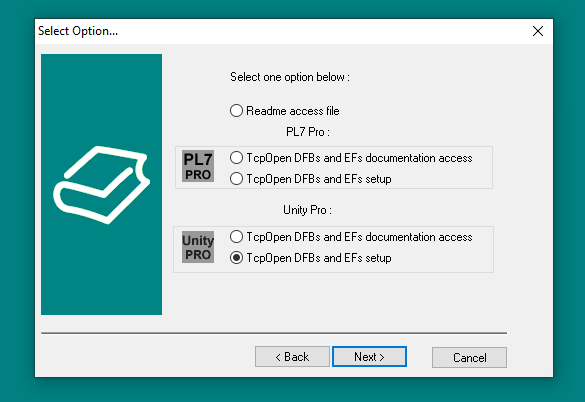
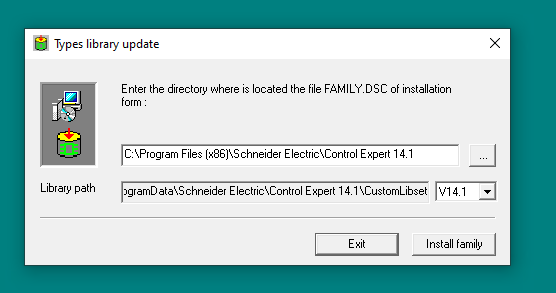
Enter the right path : C:\ProgramData\Schneider Electric\Control Expert 15.2\CustomLibset\V15.2\TcpOpenInstall\FFBInstall\Advanced and not the default one.
Then it will automatically add the library in CE V15.0.
Product Line
PLC Premium, TSX ETY 5103, TSX ETY 110WS,
Environment
Microsoft Windows 10 64-bit (version 21H1 or newer), Microsoft Windows 10 64-bit Enterprise 2019 LTSC (version 1809), Microsoft Windows Server 2019 (standard 1809 version), Microsoft Windows 11 64-bit (version 21H1 or newer), Microsoft Windows Server 2022 (version 21H1 or newer), EcoStruxure Control Expert V15.0
Below is the step-by-step procedure to follow to install the TCP Open library setup :
- Unzip the TCP open library
- Run as administrator the .exe inside
- Select TCPopen DFBs and EFs setup
- Click next and when it asks for the directory of the FAMILY.DSC :
Enter the right path : C:\ProgramData\Schneider Electric\Control Expert 15.2\CustomLibset\V15.2\TcpOpenInstall\FFBInstall\Advanced and not the default one.
Then it will automatically add the library in CE V15.0.
Product Line
PLC Premium, TSX ETY 5103, TSX ETY 110WS,
Environment
Microsoft Windows 10 64-bit (version 21H1 or newer), Microsoft Windows 10 64-bit Enterprise 2019 LTSC (version 1809), Microsoft Windows Server 2019 (standard 1809 version), Microsoft Windows 11 64-bit (version 21H1 or newer), Microsoft Windows Server 2022 (version 21H1 or newer), EcoStruxure Control Expert V15.0