


Easergy Pro can’t connect with P3
Issue
Customer found that his laptop can connect with some of P3 relay through front USB port, but some of P3 relays can’t be connected with Easergy Pro.
_____________________________________________________________
Product Line
Easergy P3
_____________________________________________________________
Environment
All firmware version
_____________________________________________________________
Root Cause
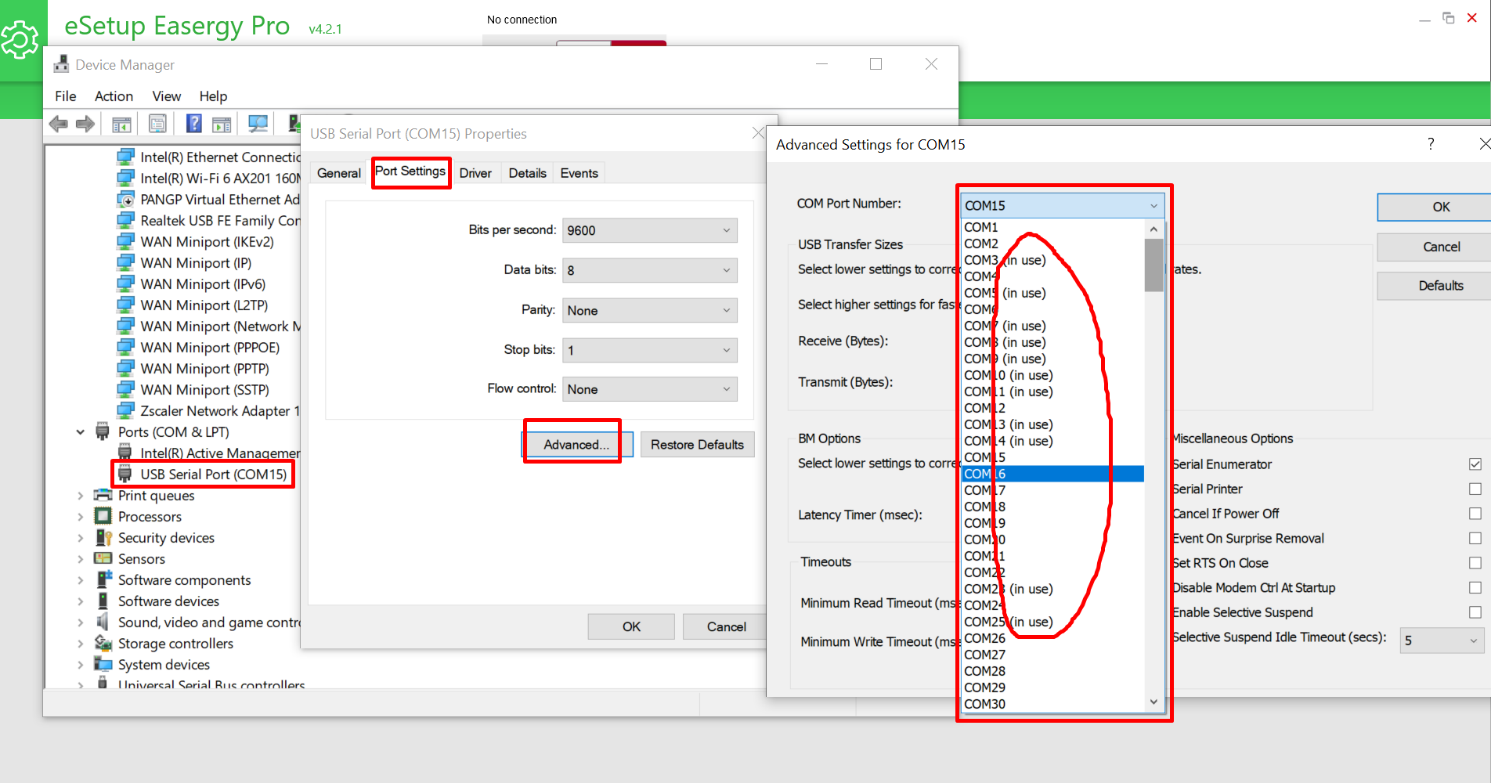
Please check the laptop-->Device Manager-->USB Serial Port-->Port settings-->Advanced-->COM Port Number.
If all the COM port are “in use” status, so no more COM port can be used for new P3 relays.
_____________________________________________________________
Solution
It is necessary to release laptop USB Serial COM ports, or use another laptop to connect Easery Pro with P3 relay.
Customer found that his laptop can connect with some of P3 relay through front USB port, but some of P3 relays can’t be connected with Easergy Pro.
_____________________________________________________________
Product Line
Easergy P3
_____________________________________________________________
Environment
All firmware version
_____________________________________________________________
Root Cause
Please check the laptop-->Device Manager-->USB Serial Port-->Port settings-->Advanced-->COM Port Number.
If all the COM port are “in use” status, so no more COM port can be used for new P3 relays.
_____________________________________________________________
Solution
It is necessary to release laptop USB Serial COM ports, or use another laptop to connect Easery Pro with P3 relay.