


Geo SCADA 2023 server crashes when the AVEVA Enterprise License Server option is selected
This article applies to Geo SCADA Expert 2023 version 86.8778.1.
GSE 2023 now offers 3 licensing options: Dongle, License File and AVEVA Enterprise License Server (AEL):
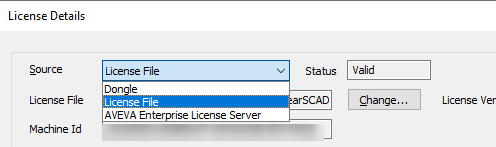
When selecting AEL without previously installing the AVEVA Enterprise Licensing tool, which is an optional package, the GSE Server may fail and not allow the end user to easily select another option. This article will show 2 ways to correct this issue.
1- The customer may run the installation files again and install the missing package:

After restarting the server, the customer will be able to select the correct option.
2- The customer may edit the registry key (regedit):
Computer\HKEY_LOCAL_MACHINE\SOFTWARE\Schneider Electric\ClearSCADA\DB
LicenceSource (DWORD) 0 = Dongle, 1 = File, 2 = AEL
Restarting the server will switch to the licensing setting in the registry.
GSE 2023 now offers 3 licensing options: Dongle, License File and AVEVA Enterprise License Server (AEL):
When selecting AEL without previously installing the AVEVA Enterprise Licensing tool, which is an optional package, the GSE Server may fail and not allow the end user to easily select another option. This article will show 2 ways to correct this issue.
1- The customer may run the installation files again and install the missing package:
After restarting the server, the customer will be able to select the correct option.
2- The customer may edit the registry key (regedit):
Computer\HKEY_LOCAL_MACHINE\SOFTWARE\Schneider Electric\ClearSCADA\DB
LicenceSource (DWORD) 0 = Dongle, 1 = File, 2 = AEL
Restarting the server will switch to the licensing setting in the registry.