


'Failed to verify the anti-forgery token' when attempting to login to the Web Application
Issue
When attempting to log into the PME Web Apps the login page will show an error message stating, "An unexpected error occurred while trying to authenticate the user" and will fail to log in, please see error below:
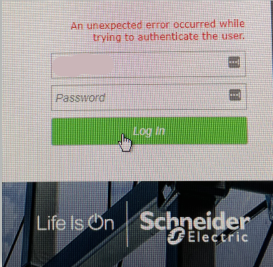
When looking into the syslog the error messages will state the following:
Failed to verify the anti-forgery token.
LogClientExtendedInformation: System.Web.Mvc.HttpAntiForgeryException (0x80004005): The anti-forgery token could not be decrypted. If this application is hosted by a Web Farm or cluster, ensure that all machines are running the same version of ASP.NET Web Pages and that the <machineKey> configuration specifies explicit encryption and validation keys. AutoGenerate cannot be used in a cluster.
at System.Web.Helpers.AntiXsrf.AntiForgeryTokenSerializer.Deserialize(String serializedToken)
at System.Web.Helpers.AntiXsrf.AntiForgeryWorker.Validate(HttpContextBase httpContext, String cookieToken, String formToken)
at System.Web.Helpers.AntiForgery.Validate(String cookieToken, String formToken)
at Framework.Web.Security.AntiForgerySupport.ValidateRequestHeader(HttpRequestBase request, Boolean onlyCheckIfUserAuthenticated)
at Framework.Web.Filters.WebAuthorizeAttribute.PerformAntiForgeryTokenValidation(HttpContextBase httpContext)
and also
Product Line
Power Monitoring Expert 2020
Power Monitoring Expert 2021
Power Monitoring Expert 2022
Power Monitoring Expert 2023
Environment
Power Monitoring Expert Web Applications
Cause
The IIS configuration is trying to use the machine key to authenticate the user logging in but the configuration for the machine key is no longer working under the automatic generation setting
Resolution
When attempting to log into the PME Web Apps the login page will show an error message stating, "An unexpected error occurred while trying to authenticate the user" and will fail to log in, please see error below:
When looking into the syslog the error messages will state the following:
Failed to verify the anti-forgery token.
LogClientExtendedInformation: System.Web.Mvc.HttpAntiForgeryException (0x80004005): The anti-forgery token could not be decrypted. If this application is hosted by a Web Farm or cluster, ensure that all machines are running the same version of ASP.NET Web Pages and that the <machineKey> configuration specifies explicit encryption and validation keys. AutoGenerate cannot be used in a cluster.
at System.Web.Helpers.AntiXsrf.AntiForgeryTokenSerializer.Deserialize(String serializedToken)
at System.Web.Helpers.AntiXsrf.AntiForgeryWorker.Validate(HttpContextBase httpContext, String cookieToken, String formToken)
at System.Web.Helpers.AntiForgery.Validate(String cookieToken, String formToken)
at Framework.Web.Security.AntiForgerySupport.ValidateRequestHeader(HttpRequestBase request, Boolean onlyCheckIfUserAuthenticated)
at Framework.Web.Filters.WebAuthorizeAttribute.PerformAntiForgeryTokenValidation(HttpContextBase httpContext)
and also
Product Line
Power Monitoring Expert 2020
Power Monitoring Expert 2021
Power Monitoring Expert 2022
Power Monitoring Expert 2023
Environment
Power Monitoring Expert Web Applications
Cause
The IIS configuration is trying to use the machine key to authenticate the user logging in but the configuration for the machine key is no longer working under the automatic generation setting
Resolution
- Open IIS Manager
- Select Default Web Site on the left under Connections
- Double-click Machine Keys
- Make sure Validation method = SHA1, Encryption method = AES
- De-select both Automatically generate at runtime and Generate a unique key for each application checkbox
- On the right under Actions, click Generate Keys
- Copy the two keys.
- For each web page under Default Web Site, perform these steps:
- Click Machine Keys
- Make sure Validation method = SHA1, Encryption method = AES
- De-select both Automatically generate at runtime and Generate a unique key for each application checkbox
- Paste the generated keys from Step 6 into their respective fields.
- Restart IIS
- Restart App mod services