


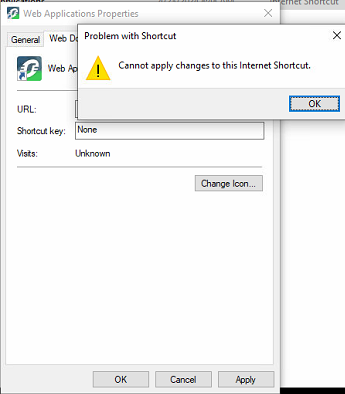
PME Web Applications 'Cannot apply changes to this Internet Shortcut'
Issue
The "Web Application" shortcut created by the PME installer cannot be changed or edited even by a local Administrator.
This directly conflicts users that are following the instructions in FAQ: How to configure PME to work with HTTPS with SSL enabled? | Schneider Electric USA (se.com)
Product Line
Power Monitoring Expert 2020
Power Monitoring Expert 2021
Power Monitoring Expert 2022
Power Monitoring Expert 2023
Environment
Power Monitoring Expert Web Applications
Cause
The shortcut created by the PME installer is protected by default and therefore requires the manual addition of security configurations in order to allow for editing
Resolution
The "Web Application" shortcut created by the PME installer cannot be changed or edited even by a local Administrator.
This directly conflicts users that are following the instructions in FAQ: How to configure PME to work with HTTPS with SSL enabled? | Schneider Electric USA (se.com)
Product Line
Power Monitoring Expert 2020
Power Monitoring Expert 2021
Power Monitoring Expert 2022
Power Monitoring Expert 2023
Environment
Power Monitoring Expert Web Applications
Cause
The shortcut created by the PME installer is protected by default and therefore requires the manual addition of security configurations in order to allow for editing
Resolution
- With the Web Applications Properties window opens, select the Security tab
- Select Edit
- Select Add
- User the UI to add the user that you are currently logged into the PME application server with
- Select OK
- Highlight the user that was added in steps 4 & 5
- Use the check box UI to add the Modify configuration to the user
- Select Apply
- Select OK
- Select the Web Document tab
- Edit the URL by following the instructions in the FAQ How to configure PME to work with HTTPS with SSL enabled? | Schneider Electric USA (se.com)