


PME 9.0 - Unhandled exception error in Database Manager when viewing database properties
Issue
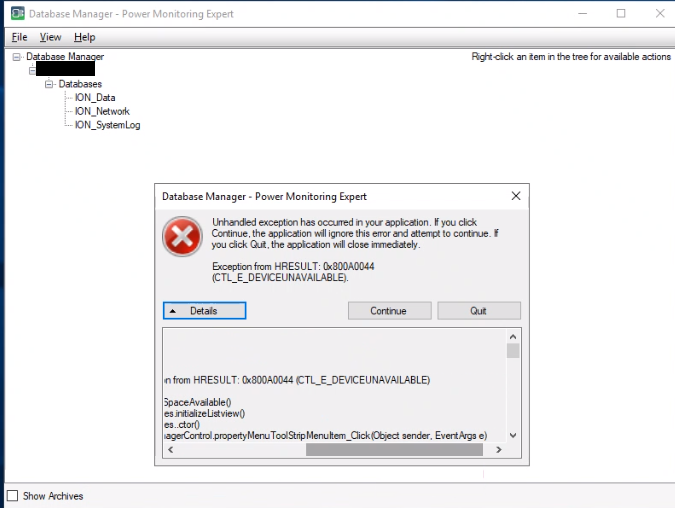
In Database Manager, right-clicking on a database and selecting Properties causes an error:
Unhandled exception has occurred in your application. If you click
Continue, the application will ignore this error and attempt to continue. If
you click Quit, the application will close immediately.
Exception from HRESULT: 0x800A0044
(CTL_E_DEVICEUNAVAILABLE).
Product Line
Power Monitoring Expert 9.0
Environment
Management Console
Database Manager
Cause
This error occurs when PME is installed as a distributed system, and the database files on the database server are stored on a drive assigned a letter that doesn't also exist on the application server. For example, this can occur if the databases are stored on F: drive on the database server, and the PME application server doesn't have an F: drive mapped to it.
Resolution
On the PME application server, map any network drive or shared folder to the same letter as the drive on the database server where the database files are stored.
For example, if the database are stored on the F: drive on the database server: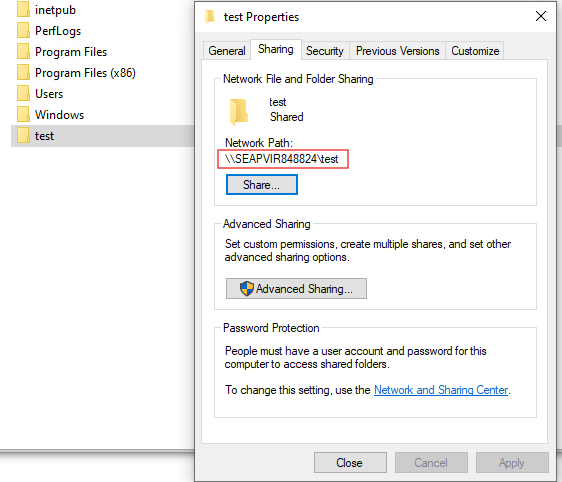
In Database Manager, right-clicking on a database and selecting Properties causes an error:
Unhandled exception has occurred in your application. If you click
Continue, the application will ignore this error and attempt to continue. If
you click Quit, the application will close immediately.
Exception from HRESULT: 0x800A0044
(CTL_E_DEVICEUNAVAILABLE).
Product Line
Power Monitoring Expert 9.0
Environment
Management Console
Database Manager
Cause
This error occurs when PME is installed as a distributed system, and the database files on the database server are stored on a drive assigned a letter that doesn't also exist on the application server. For example, this can occur if the databases are stored on F: drive on the database server, and the PME application server doesn't have an F: drive mapped to it.
Resolution
On the PME application server, map any network drive or shared folder to the same letter as the drive on the database server where the database files are stored.
For example, if the database are stored on the F: drive on the database server:
- On the PME application server, create a new folder
- Right-click on the folder > select Properties
- On the Sharing tab, click Share
- In the Network access window, click Share
- On the Sharing tab of the folder properties window, copy the Network Path:
6. In the left pane, right-click on This PC > Map network drive...
7. Select the drive letter that matches the drive letter where the databases are stored on the database server, and paste the network path of the shared folder:
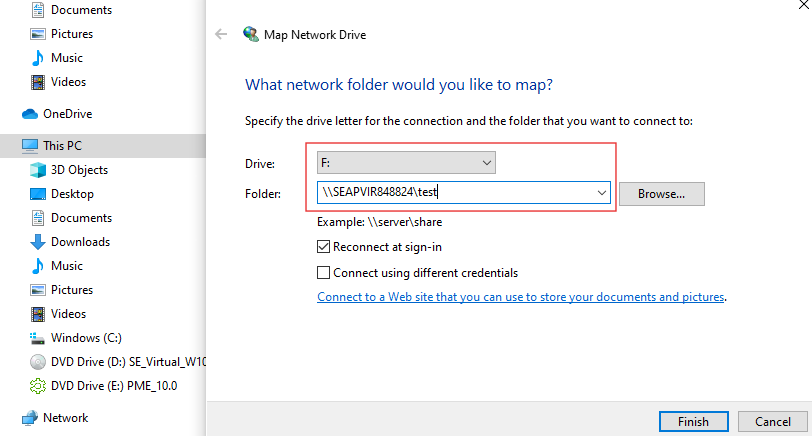
8. Click Finish
7. Select the drive letter that matches the drive letter where the databases are stored on the database server, and paste the network path of the shared folder:
8. Click Finish