


How to undock the outout window to allow a obtain more workspace.
Issue
How to undock the outout window to allow a obtain more workspace.
Product Line
Unity
Environment
Windows 10
Resolution
The following steps can be used to undock the output window to obtain a larger workspace by
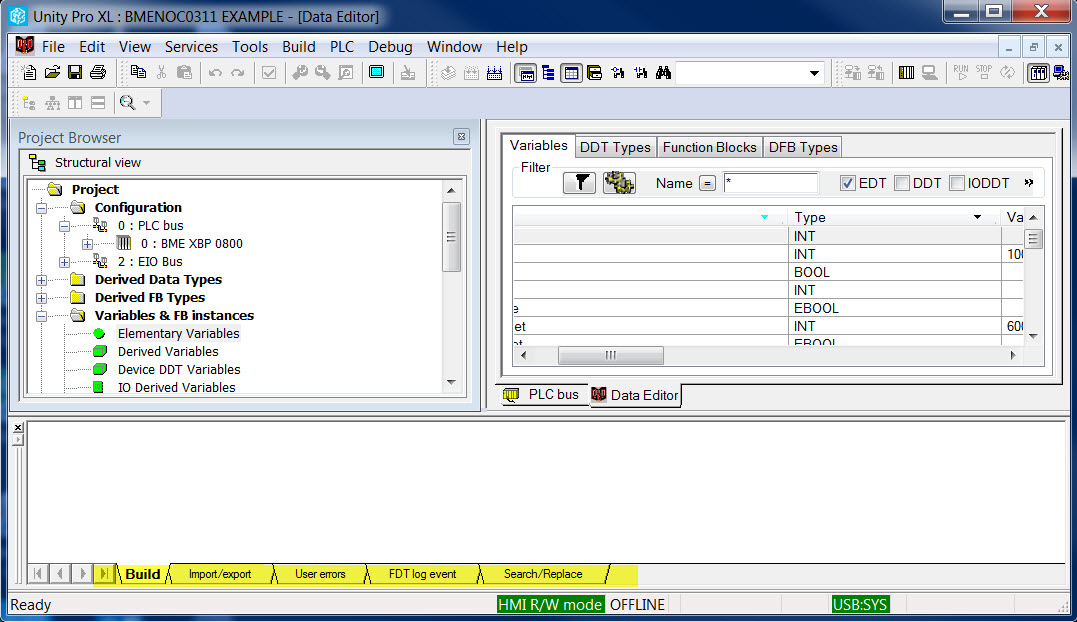
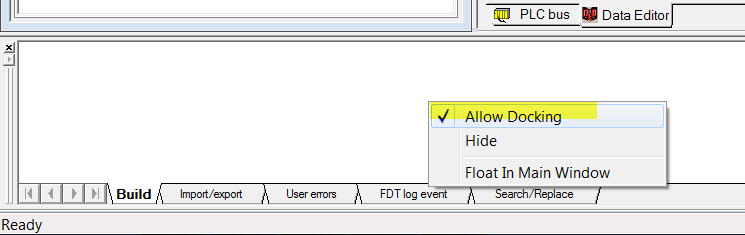
This causes the ouput window is resized to a smaller window that floats on top of Unity and it can be moved out of the way.
This gives the user more space to work with the application.
How to undock the outout window to allow a obtain more workspace.
Product Line
Unity
Environment
Windows 10
Resolution
The following steps can be used to undock the output window to obtain a larger workspace by
- Start Unity
- Open an application
- Right click on one of the tabs in the output window.
- Click on 'Allow Docking'.
This causes the ouput window is resized to a smaller window that floats on top of Unity and it can be moved out of the way.
This gives the user more space to work with the application.
Released for: Schneider Electric Netherlands
