


How can we help you today?
Opening an '.sta' file for a CanOpen application returns the error 'The required application object reference...CanOpen_Option_Default ... signature is different'
Issue
Opening an '.sta' file for a CanOpen application returns the error 'The required application object reference...CanOpen_Option_Default ... SIGNATURE is different'
Product Line
Unity
Environment
Windows 10
Resolution
After importing the '.eds' file for a CanOpen deivce into the Hardware Catalog and opening an '.sta' file for a CanOpen application returns
the error 'The required application object reference <...CanOpen_Option_Default ...> signature is different'.
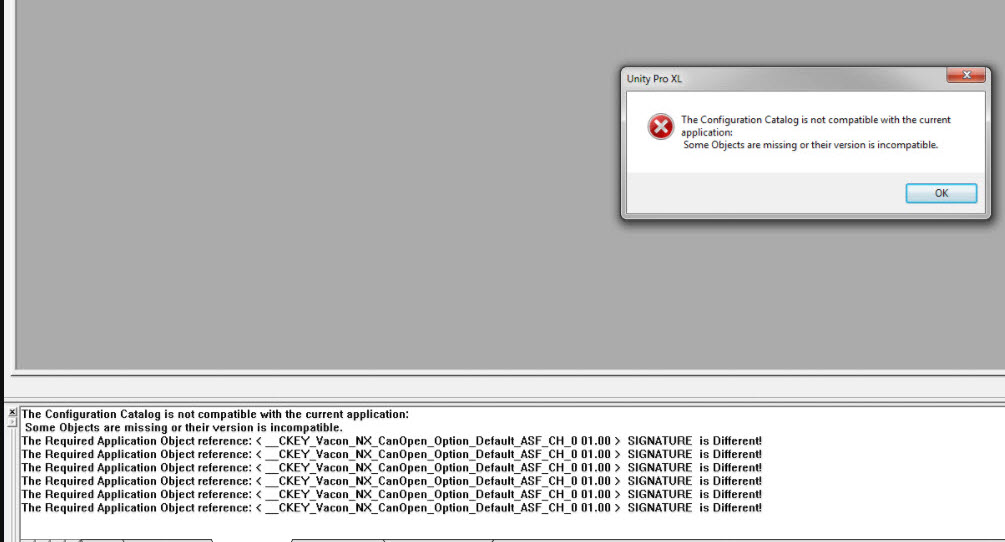
The following steps can be used to resolve the issue:.
Opening an '.sta' file for a CanOpen application returns the error 'The required application object reference...CanOpen_Option_Default ... SIGNATURE is different'
Product Line
Unity
Environment
Windows 10
Resolution
After importing the '.eds' file for a CanOpen deivce into the Hardware Catalog and opening an '.sta' file for a CanOpen application returns
the error 'The required application object reference <...CanOpen_Option_Default ...> signature is different'.
The following steps can be used to resolve the issue:.
- Open the Hardware Catalog Manager
- Delete the third party device. This will delete '.eds' file from the catalog.
- Build the Hardware Catalog
- Open the '.sta' file.
Note: Opening of the '.sta' file by Unity Pro automatically updates the Hardware catalog including the equipment with the
correct signature.
Released for: Schneider Electric Netherlands
Explore more
Range:

Explore more
Range:
Need help?
Get a Quote
Start your sales inquiry online and an expert will connect with you.
Where to buy?
Easily find the nearest Schneider Electric distributor in your location.
Help Center
Find support resources for all your needs, in one place.