


How can we help you today?
Data Center Expert | How do I configure the location of my advanced view installation for launching to NetBotz Appliances?
Issue:
When attempting to launch Advanced View within Data Center Expert, an error occurs stating that “You must configure the location of your Advanced View installation in Client Preferences to use this feature.”
Product Line:
Struxureware Data Center Expert (DCE)
Environment:
Struxureware Data Center Expert (all verisons)
Cause:
The location of the Advanced View installation has not been configured (or configured incorrectly) in the Data Center Expert desktop client.
Resolution:
When attempting to launch Advanced View within Data Center Expert, an error occurs stating that “You must configure the location of your Advanced View installation in Client Preferences to use this feature.”
Product Line:
Struxureware Data Center Expert (DCE)
Environment:
Struxureware Data Center Expert (all verisons)
Cause:
The location of the Advanced View installation has not been configured (or configured incorrectly) in the Data Center Expert desktop client.
Resolution:
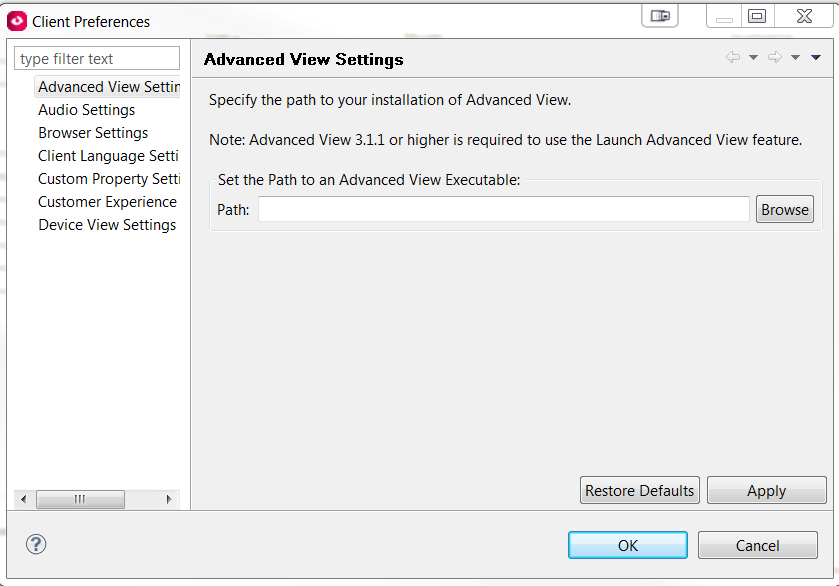
- Log into the Data Center Expert desktop client.
- File menu > Client Preferences.
- Select Advanced View Settings.
- Select Browse and navigate to the Advanced View executable within Advanced View's installation directory.
- Click Apply and OK.
Released for: Schneider Electric Australia
Explore more
Range:

Explore more
Range:
Need help?
Product Selector
Quickly and easily find the right products and accessories for your applications.
Get a Quote
Start your sales inquiry online and an expert will connect with you.
Where to buy?
Easily find the nearest Schneider Electric distributor in your location.
Help Centre
Find support resources for all your needs, in one place.