


Configuring Virtual Machines to shut down when a Hyper-V host is commanded to shut down.
Issue:
How to configure the shutdown of virtual machines when a Hyper-V host is commanded to shut down on Windows Hyper-V
Product:
PowerChute Network Shutdown
PowerChute Serial Shutdown
PowerChute Business Edition
Environment:
Windows Hyper-V
Solution:
For virtual machines to shut down gracefully when the host is commanded to shut down, you need to configure each Virtual Machine to shut down the guest operating system.
To do this: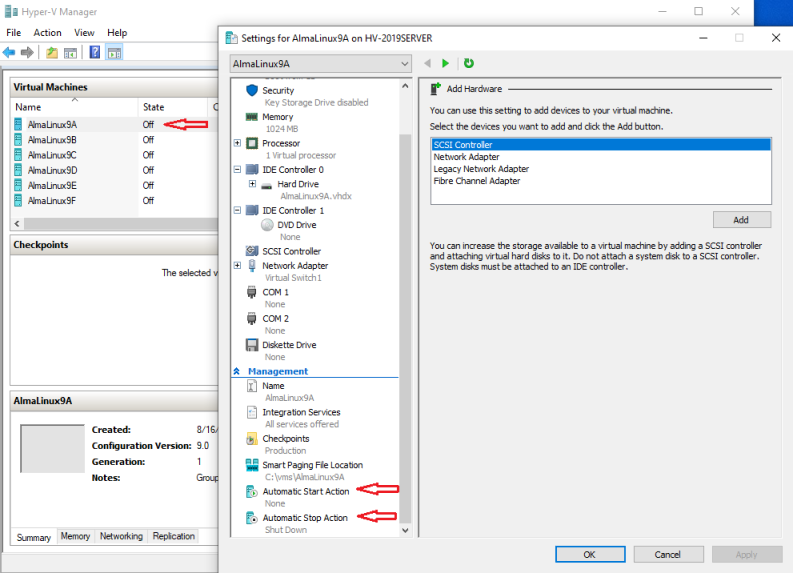
See video at https://www.youtube.com/watch?v=dJ7yydlbZoI
and https://www.elevenforum.com/t/change-automatic-stop-action-of-hyper-v-virtual-machine-in-windows-11.4206/
For PowerChute Network Shutdown v3.1 and above, steps 5, 6, and 7 are not required if you have enabled the VM shutdown startup option in PowerChute when Hyper-V Support has been enabled.
If you wish to allow Hyper-V to handle VM shutdown instead, enable the Automatic Stop-Start Action outlined in steps 5, 6, and 7 above.
How to configure the shutdown of virtual machines when a Hyper-V host is commanded to shut down on Windows Hyper-V
Product:
PowerChute Network Shutdown
PowerChute Serial Shutdown
PowerChute Business Edition
Environment:
Windows Hyper-V
Solution:
For virtual machines to shut down gracefully when the host is commanded to shut down, you need to configure each Virtual Machine to shut down the guest operating system.
To do this:
- In Hyper-V Manager, right-click on the VM and select Settings.
- Under Management, check if the Integration Services option is shown – if it is, proceed to step 4.
- If Integration Services is not already installed:
- Right-click on the VM and select Connect.
- In the console window, select the Action menu and choose “Insert Integration Services setup disk.”
- Double-click the VM guest disk to continue with the installation.
- In Hyper-V Manager, choose the VM and then "Settings." Click on the Integration Services option and ensure “Operating System Shutdown” is enabled.
- Choose the "Automatic Stop Action" option under Management.
- Choose "Shut down the guest operating system."
- To restart with the host, select Automatic Start Action."
See video at https://www.youtube.com/watch?v=dJ7yydlbZoI
and https://www.elevenforum.com/t/change-automatic-stop-action-of-hyper-v-virtual-machine-in-windows-11.4206/
For PowerChute Network Shutdown v3.1 and above, steps 5, 6, and 7 are not required if you have enabled the VM shutdown startup option in PowerChute when Hyper-V Support has been enabled.
If you wish to allow Hyper-V to handle VM shutdown instead, enable the Automatic Stop-Start Action outlined in steps 5, 6, and 7 above.