


Why are Diagrams not displaying any values from Web Applications/Diagrams but are showing values in Vista in PME 7.2.2?
Issue:
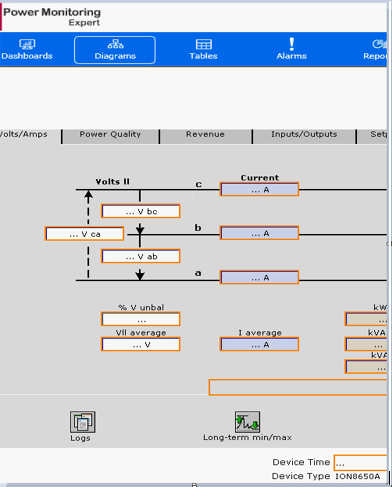
When opening a diagram in Web Applications' Diagrams, the diagram shows orange boxes with "..." and no values as shown below.
The same diagram is displayed correctly in Vista.
Product Line
Struxureware Power Monitoring 7.0.1
Power Monitoring Expert 7.2.x
Environment
Power Monitoring Expert
Web Applications
Diagrams
Cause
Struxureware Power Monitoring (SPM) 7.0.1 and Power Monitoring Expert (PME) 7.2.x Management Console allows the name of devices to include special characters as part of the device name.
These special characters are known to cause problems with the Web Applications.
PME 8.x does not allow special characters as part of the device name,
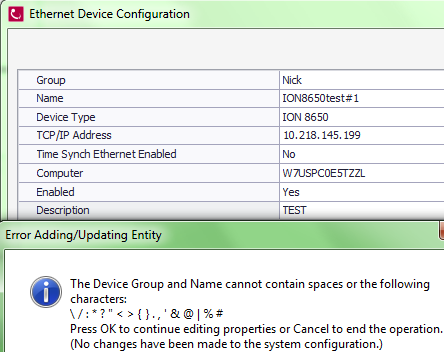
PME 8.X Management console will display the message below not allowing special characters for the device name.
Resolution:
*Warning: Irreparable database damage can occur. This procedure should only be performed by users familiar with SQL Server Management Studio. Databases should be backed up prior to performing this procedure.*
Please take the following steps to resolve this problem.
When opening a diagram in Web Applications' Diagrams, the diagram shows orange boxes with "..." and no values as shown below.
The same diagram is displayed correctly in Vista.
Product Line
Struxureware Power Monitoring 7.0.1
Power Monitoring Expert 7.2.x
Environment
Power Monitoring Expert
Web Applications
Diagrams
Cause
Struxureware Power Monitoring (SPM) 7.0.1 and Power Monitoring Expert (PME) 7.2.x Management Console allows the name of devices to include special characters as part of the device name.
These special characters are known to cause problems with the Web Applications.
PME 8.x does not allow special characters as part of the device name,
PME 8.X Management console will display the message below not allowing special characters for the device name.
Resolution:
*Warning: Irreparable database damage can occur. This procedure should only be performed by users familiar with SQL Server Management Studio. Databases should be backed up prior to performing this procedure.*
Please take the following steps to resolve this problem.
1. Make a backup of ION_Data and ION_Network Databases from SQL Management Studio
2. Rename the device in Management Console making sure there are no special characters on the device name.
3. Stop the Application Modules and all ION Services from Control Panel\Administrative Tools\Services
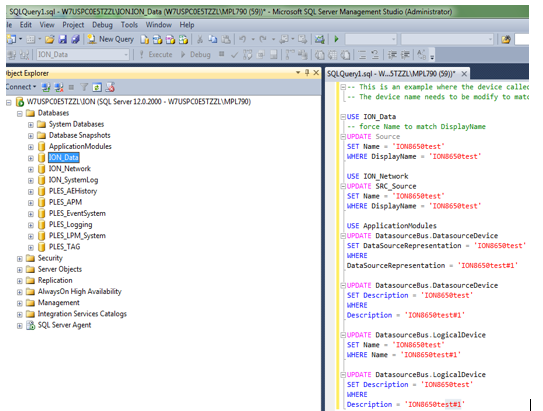
4 Copy the SQL query below and paste it as a New Query in SQL Management Studio. It should look like the screenshot
below before pressing Execute.
2. Rename the device in Management Console making sure there are no special characters on the device name.
3. Stop the Application Modules and all ION Services from Control Panel\Administrative Tools\Services
4 Copy the SQL query below and paste it as a New Query in SQL Management Studio. It should look like the screenshot
below before pressing Execute.
-- This is an example where the device called ION8650test#1 was renamed to ION8650test
-- The device name needs to be modified to match the desired device name before running this SQL query.
USE ION_Data
-- force Name to match DisplayName
UPDATE Source
SET Name = 'ION8650test'
WHERE DisplayName = 'ION8650test'
USE ION_Network
UPDATE SRC_Source
SET Name = 'ION8650test'
WHERE DisplayName = 'ION8650test'
USE ApplicationModules
UPDATE DatasourceBus.DatasourceDevice
SET DataSourceRepresentation = 'ION8650test'
WHERE DataSourceRepresentation = 'ION8650test#1'
UPDATE DatasourceBus.DatasourceDevice
SET Description = 'ION8650test'
WHERE Description = 'ION8650test#1'
UPDATE DatasourceBus.LogicalDevice
SET Name = 'ION8650test'
WHERE Name = 'ION8650test#1'
UPDATE DatasourceBus.LogicalDevice
SET Description = 'ION8650test'
WHERE Description = 'ION8650test#1'
-- The device name needs to be modified to match the desired device name before running this SQL query.
USE ION_Data
-- force Name to match DisplayName
UPDATE Source
SET Name = 'ION8650test'
WHERE DisplayName = 'ION8650test'
USE ION_Network
UPDATE SRC_Source
SET Name = 'ION8650test'
WHERE DisplayName = 'ION8650test'
USE ApplicationModules
UPDATE DatasourceBus.DatasourceDevice
SET DataSourceRepresentation = 'ION8650test'
WHERE DataSourceRepresentation = 'ION8650test#1'
UPDATE DatasourceBus.DatasourceDevice
SET Description = 'ION8650test'
WHERE Description = 'ION8650test#1'
UPDATE DatasourceBus.LogicalDevice
SET Name = 'ION8650test'
WHERE Name = 'ION8650test#1'
UPDATE DatasourceBus.LogicalDevice
SET Description = 'ION8650test'
WHERE Description = 'ION8650test#1'