.svg)
Issue
How to configure the VMware Workstation to install install the PLCUSB driver for the M340 to communicate with Unity.
Product Line
Unity
Environment
Windows 10
Resolution
When you run Unity in a operating system within VMware, Unity does not see the M340 PLC connected to the PC.,
In order for the USB connection to work properly in the operating system running in the VMware workstation, you need to install the VMware Tools.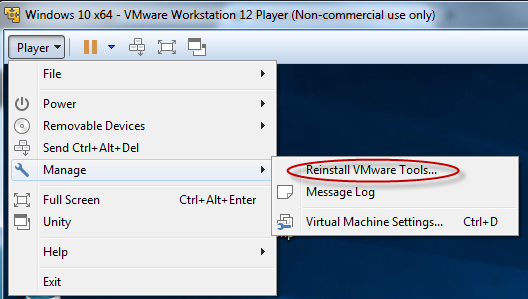
After the VMWare Tools is installed:
How to configure the VMware Workstation to install install the PLCUSB driver for the M340 to communicate with Unity.
Product Line
Unity
Environment
Windows 10
Resolution
When you run Unity in a operating system within VMware, Unity does not see the M340 PLC connected to the PC.,
In order for the USB connection to work properly in the operating system running in the VMware workstation, you need to install the VMware Tools.
- Click on Manage
- Select Install VMWare tools.
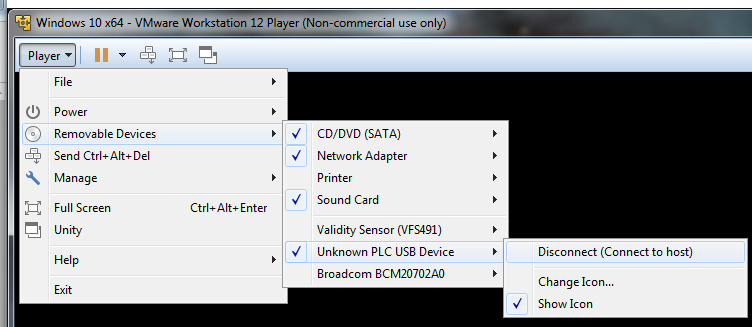
After the VMWare Tools is installed:
- Run the Setup for the USB driver.
- Plug in the USB cable connected to the M340.
- Click on Player
- Select 'Removable Devices'.
- Select PLC USB from the drop down list.
- Select 'Connect'.
Publié pour: Schneider Electric Belgium

