


How do we find the list of unused variables in Vijeo Designer?
Issue:
Unused variables in Vijeo Designer will take up memory even when they are not used in any object. It is recommended to remove them to optimize memory usage.
Environment:
Vijeo Designer V4.3 or higher.
Resolultion:
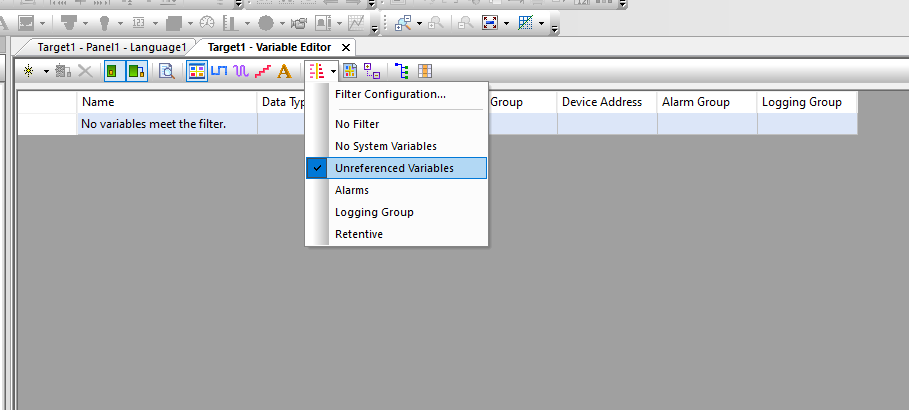
In Vijeo Designer, there is a variable filter called "Unreferenced Variables" in the variable list view. To setup the filter, find the filter drop-down menu in the toolbar of the variable list view (it is beside the string data type filter) and set it to "Unreferenced variables". Note, your application must validate before the list of variables can be determined. If your project does not validate, please correct any errors first. Note that the filter will also determine that some array elements are not used. Since you cannot just delete a single array element, you will have to ignore this result.
Unused variables in Vijeo Designer will take up memory even when they are not used in any object. It is recommended to remove them to optimize memory usage.
Environment:
Vijeo Designer V4.3 or higher.
Resolultion:
In Vijeo Designer, there is a variable filter called "Unreferenced Variables" in the variable list view. To setup the filter, find the filter drop-down menu in the toolbar of the variable list view (it is beside the string data type filter) and set it to "Unreferenced variables". Note, your application must validate before the list of variables can be determined. If your project does not validate, please correct any errors first. Note that the filter will also determine that some array elements are not used. Since you cannot just delete a single array element, you will have to ignore this result.