


How do I add a BOOLEAN Momentary On switch in EcoStruxure Operator Terminal Expert?
Issue
How do I add a BOOLEAN Momentary On switch in EcoStruxure Operator Terminal Expert?
Product Line
Vijeo XD, EcoStruxure Operator Terminal Expert
Environment
Configuration Software in Windows
Resolution
By using a script, we can customize this behavior for any screen object:
Method 1: A script that sets a BOOL for a defined time upon button press (of a Rectangle object).
See attachment "Method 1 Script - Timed Set-Reset.png" for the sample script to do this.
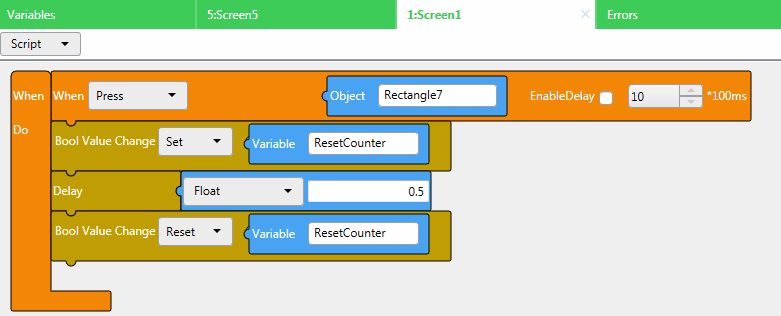
The screenshot describes an Object "Rectangle 7" that on press will Set the BOOL Variable named "ResetCounter" to TRUE for 0.5seconds, then Reset the "ResetCounter" back to false after the 0.5seconds elapsed time.
Method 2: A script that sets a BOOL to TRUE on button press, and resets the value back to FALSE on release.
See attachment "Method 2 Script - On Touch and Release.png" for the sample script to do this.
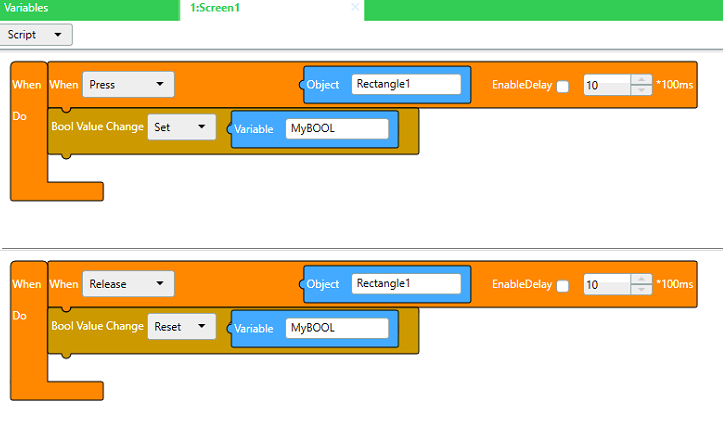
The screenshot describes an Object "Rectangle 1" that on press will SET the BOOL Variable named "MyBOOL" to TRUE, and upon releasing touch of that Rectangle will RESET the value of MyBOOL to FALSE.
Note: A switch with a built-in "Momentary On" functionality, will be included in the future version - EcoStruxure Operator Terminal Expert v3.2. The release date of this software has not yet been announced.
How do I add a BOOLEAN Momentary On switch in EcoStruxure Operator Terminal Expert?
Product Line
Vijeo XD, EcoStruxure Operator Terminal Expert
Environment
Configuration Software in Windows
Resolution
By using a script, we can customize this behavior for any screen object:
Method 1: A script that sets a BOOL for a defined time upon button press (of a Rectangle object).
See attachment "Method 1 Script - Timed Set-Reset.png" for the sample script to do this.
The screenshot describes an Object "Rectangle 7" that on press will Set the BOOL Variable named "ResetCounter" to TRUE for 0.5seconds, then Reset the "ResetCounter" back to false after the 0.5seconds elapsed time.
Method 2: A script that sets a BOOL to TRUE on button press, and resets the value back to FALSE on release.
See attachment "Method 2 Script - On Touch and Release.png" for the sample script to do this.
The screenshot describes an Object "Rectangle 1" that on press will SET the BOOL Variable named "MyBOOL" to TRUE, and upon releasing touch of that Rectangle will RESET the value of MyBOOL to FALSE.
Note: A switch with a built-in "Momentary On" functionality, will be included in the future version - EcoStruxure Operator Terminal Expert v3.2. The release date of this software has not yet been announced.