


Easy PDU in Factory Mode
Issue: Easy PDU in Factory Mode
Product Line:
EPDU1016S, EPDU1116S, EPDU1132S,
EPDU1216S, EPDU1232S
EPDU1016M EPDU1116M, EPDU1132M
EPDU1216M, EPDU1232M
Environment:
All Serial Numbers
Cause:
When a PDU is in Factory Mode, some settings can not be changed. Most common behavior is when setting the IP to Static. Changing the IP to static then restarting the PDU will keep the IP setting to DHCP.
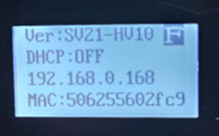
In the display, there is an F on the upper right of the display when the PDU is in Factory Mode.
Solution:
Access the assigned IP Address and type this in the browser's address bar. https://pdu_ip/set/log.html
Login with the administrator account. Default user and password is apc
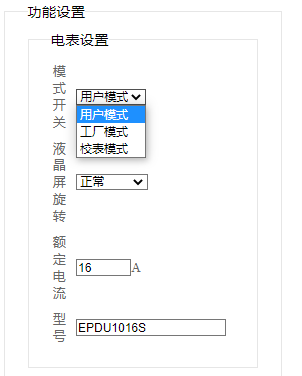
The page is in Chinese by default. If your browser supports translation, this page can be translated. Below example of the page is in English. Select User Mode to exit the PDU out of Factory mode. Then click the set up button.
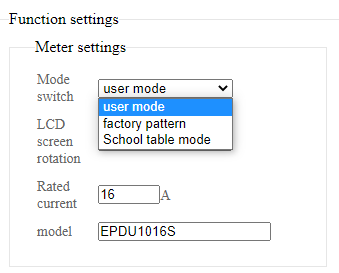
If the browser can’t translate the page, select the highlighted option to set the PDU to User Mode.
Then click this button below.
Product Line:
EPDU1016S, EPDU1116S, EPDU1132S,
EPDU1216S, EPDU1232S
EPDU1016M EPDU1116M, EPDU1132M
EPDU1216M, EPDU1232M
Environment:
All Serial Numbers
Cause:
When a PDU is in Factory Mode, some settings can not be changed. Most common behavior is when setting the IP to Static. Changing the IP to static then restarting the PDU will keep the IP setting to DHCP.
In the display, there is an F on the upper right of the display when the PDU is in Factory Mode.
Solution:
Access the assigned IP Address and type this in the browser's address bar. https://pdu_ip/set/log.html
Login with the administrator account. Default user and password is apc
The page is in Chinese by default. If your browser supports translation, this page can be translated. Below example of the page is in English. Select User Mode to exit the PDU out of Factory mode. Then click the set up button.
If the browser can’t translate the page, select the highlighted option to set the PDU to User Mode.
Then click this button below.