


Video: How do I mute the alarms on my Smart-UPS?
Issue:
How do I mute the alarms on my Smart-UPS?
Product Line:
Smart-UPS models beginning with SU, SUA, SUM, SC, SCL, SMT, SMTL, SMX
Smart-UPS On-Line models beginning with SURT, SR1, SURTD, SRT, SRTL
Environment:
All models specified above, All Serial Numbers
Cause:
Smart-UPS products use a beeping tone to indicate various modes of operation. Some customers may want to mute these alarms.
Resolution:
Smart-UPS models with LED indicator lights on the front panel (No LCD Display):
he model numbers of these units would begin with SU, SUA, SURT, or SUM. You can mute alarms via the Network Management Card or Power Chute Business Edition. Muting alarms on these units will mute everything except for the Low Battery Signal Alarm, which is a continuous beeping for the duration of the Low Battery Signal. There is no way to mute this alarm. You can configure the Low Battery Signal via Power Chute or the Network Management Card. It defaults to 2 minutes. Alternately, if the unit is on battery and you want to temporarily mute the on battery alarm, you can press the I/Test button the front of the UPS. This will mute the on battery alarm until the unit hits the low battery signal.
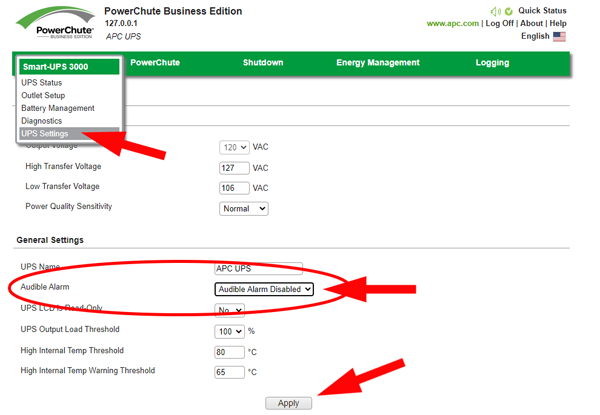
To mute Alarms from Powerchute Business Edition:
Click on the name of the UPS then choose "UPS Settings", set Audible Alarm to Disabled, Then click Apply.
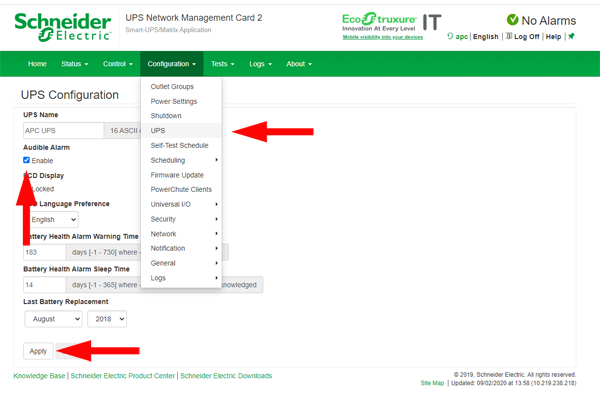
To mute Alarms from a Network Management Card:
From the "Configuration" menu choose "UPS", then unclick "Audible Alarms" and click "Apply"
Smart-UPS models with an LCD screen on the front panel:
You can mute all alarms including the Low Battery Signal. These units have model numbers beginning with SMC, SMT, SMTL, SMX, or SRT. You can configure this via a Network Management Card, Power Chute Business Edition, or directly from the LCD screen. On the LCD screen, go to the "Configuration" screen and then select "Audible Alarms".
How do I mute the alarms on my Smart-UPS?
Product Line:
Smart-UPS models beginning with SU, SUA, SUM, SC, SCL, SMT, SMTL, SMX
Smart-UPS On-Line models beginning with SURT, SR1, SURTD, SRT, SRTL
Environment:
All models specified above, All Serial Numbers
Cause:
Smart-UPS products use a beeping tone to indicate various modes of operation. Some customers may want to mute these alarms.
Resolution:
Smart-UPS models with LED indicator lights on the front panel (No LCD Display):
he model numbers of these units would begin with SU, SUA, SURT, or SUM. You can mute alarms via the Network Management Card or Power Chute Business Edition. Muting alarms on these units will mute everything except for the Low Battery Signal Alarm, which is a continuous beeping for the duration of the Low Battery Signal. There is no way to mute this alarm. You can configure the Low Battery Signal via Power Chute or the Network Management Card. It defaults to 2 minutes. Alternately, if the unit is on battery and you want to temporarily mute the on battery alarm, you can press the I/Test button the front of the UPS. This will mute the on battery alarm until the unit hits the low battery signal.
To mute Alarms from Powerchute Business Edition:
Click on the name of the UPS then choose "UPS Settings", set Audible Alarm to Disabled, Then click Apply.
To mute Alarms from a Network Management Card:
From the "Configuration" menu choose "UPS", then unclick "Audible Alarms" and click "Apply"
Smart-UPS models with an LCD screen on the front panel:
You can mute all alarms including the Low Battery Signal. These units have model numbers beginning with SMC, SMT, SMTL, SMX, or SRT. You can configure this via a Network Management Card, Power Chute Business Edition, or directly from the LCD screen. On the LCD screen, go to the "Configuration" screen and then select "Audible Alarms".