


How can we help you today?
Video: How do you remove the front main cover on the ATV61 and ATV71 drives?
Issue:
Remove the front main cover on the ATV61/71 drives.
Product Line:
Altivar ATV61 ATV71
Environment:
All
Cause:
Needs to know how to remove the front cover to replace it or to add an option card.
Resolution:
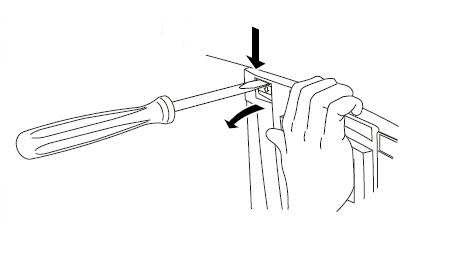
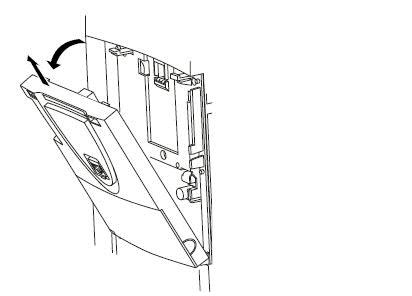
Push in the two front tabs at the top of the drive while pulling the top cover toward you.
Tools needed: Flathead screwdriver.

Remove the front main cover on the ATV61/71 drives.
Product Line:
Altivar ATV61 ATV71
Environment:
All
Cause:
Needs to know how to remove the front cover to replace it or to add an option card.
Resolution:
Push in the two front tabs at the top of the drive while pulling the top cover toward you.
Tools needed: Flathead screwdriver.
Released for: Schneider Electric Ireland

Need help?
Product Selector
Quickly and easily find the right products and accessories for your applications.
Where to buy?
Easily find the nearest Schneider Electric distributor in your location.
Help Centre
Search topic-related frequently asked questions to find answers you need.