


What is the procedure to format of microSD card larger than 32GB for ScadaPack X70?
Use the following procedure to prepare a microSD card larger than 32 GB. This procedure will erase the content of the microSD card. The Disk Management tool can erase the contents of the PC hard disk as well if used incorrectly.
1.Insert the microSD card into your PC.
You may need to use an SD to microSD card adapter, or a microSD to USB adapter depending on the interfaces available on your PC.
2.Click Start > Settings.
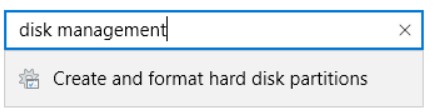
3.In the search box, enter Disk Management and then select Create and format hard disk partitions to start the Disk Management tool.
4.Select the Removable drive that corresponds to the microSD card to be formatted.
5.Right-click and select Shrink Volume.
6.In the field Enter the amount of space to shrink in MB enter 32000.
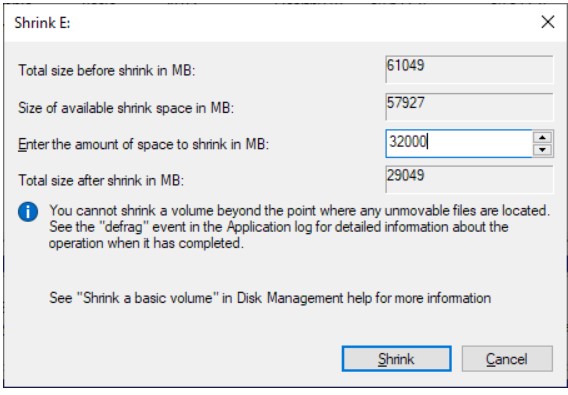
7.Click Shrink.
8.Right-click on the Volume and select Format.
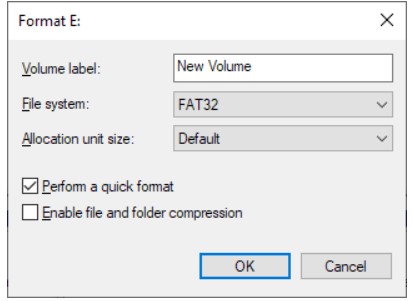
9.In File System select FAT32.
10.Check the Perform a Quick Format box.
11.Click OK
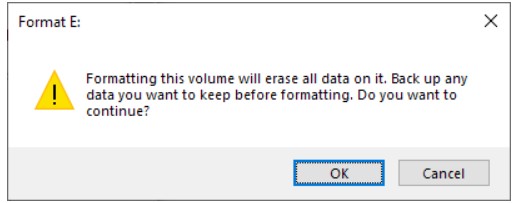
12.Click OK to format the volume.
This erases the data on the microSD card.
1.Insert the microSD card into your PC.
You may need to use an SD to microSD card adapter, or a microSD to USB adapter depending on the interfaces available on your PC.
2.Click Start > Settings.
3.In the search box, enter Disk Management and then select Create and format hard disk partitions to start the Disk Management tool.
4.Select the Removable drive that corresponds to the microSD card to be formatted.
5.Right-click and select Shrink Volume.
6.In the field Enter the amount of space to shrink in MB enter 32000.
7.Click Shrink.
8.Right-click on the Volume and select Format.
9.In File System select FAT32.
10.Check the Perform a Quick Format box.
11.Click OK
12.Click OK to format the volume.
This erases the data on the microSD card.
Released for: Schneider Electric India
