


How to modify the external project path for Vijeo Designer ?
The goal of this article is to explain how to modify the external project path for Vijeo Designer if it had been modified or is incorrect.
The article is applicable for Vijeo Designer v6.2 or more.
For example, it's possible to install Vijeo Designer software on a system disk (as C:\ ) and store the project on another disk (as D:\ )
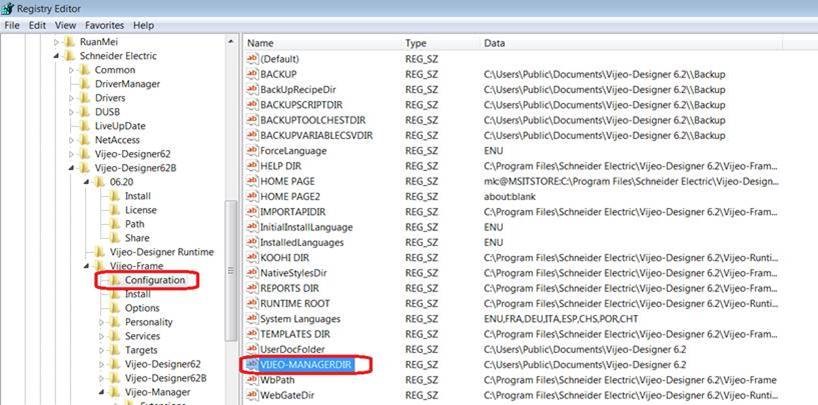
To modify paths, please use the regedit tool and modify 2 registry keys in the registry base :
The article is applicable for Vijeo Designer v6.2 or more.
For example, it's possible to install Vijeo Designer software on a system disk (as C:\ ) and store the project on another disk (as D:\ )
To modify paths, please use the regedit tool and modify 2 registry keys in the registry base :
- " Vijeo-frame -> Vijeo-Manager -> ROOTDIR "
- " Vijeo-frame -> Configuration -> VijeoManagerDir "