


How to prevent TeSys Island bus coupler and starter modules from getting faulty and diagnose the error in configuration tool
In order to prevent TeSys island to get faulty we need to consider following installation and wiring guidelines
Bus Coupler Installation and Wiring:
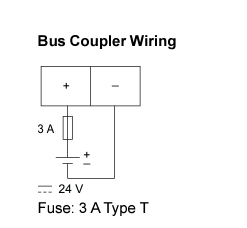
Bus Coupler Installation and Wiring:
- 24VDC power supply should have SELV rating (For more data on SELV rating please follow the link: https://www.se.com/in/en/faqs/FA253330/) from Schneider product ABL8RPS24030 can be used.
- Install the power supply in the same cabinet as TeSys Island
- Use one 24VDC power supply for one TeSys Island.
Starter module getting stuck:
Using one 24VDC power supply for one TeSys Island As the contactor operates the current drawn from the power supply will be momentarily high. Due to this the voltage gets reduced from 24V to a lower voltage for a momentary period.
When there is less input voltage even then the Bus coupler provides power to the starters and there is logic in firmware to cut off the supply when input voltage is less. By the time the firmware has sensed the voltage is less already the starter processor has seen the low voltage and it tries to power on with low voltage.
As the starter processor is having power cycles in short period of time the IO of the processor gets struck and the starter cannot close. This behaviour is completely random, and it is not always the same module gets struck.
Other reasons for Starter getting stuck:
There are multiple reasons for starters getting struck
1. Power supply is shared with other modules apart from the Island.
2. Due to EMI/EMC where external voltages are applied to the Environment
3. Due to no space for heat dissipation form the starters.
4. Installation of Island in vertical orientation without applying derating factor of 20%.
CanOpen Ribbon cable Circuit getting Damaged:
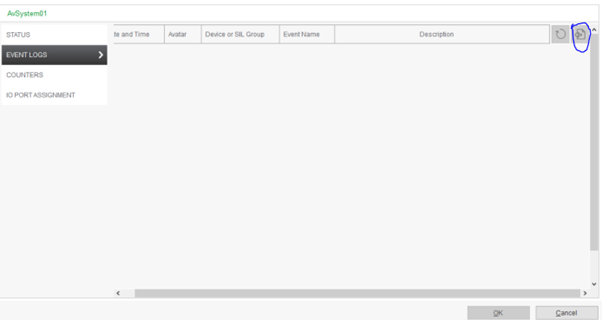
In SoMove online mode, from diagnostic TAB we can get option to export system logs -Event and Audit.
Using one 24VDC power supply for one TeSys Island As the contactor operates the current drawn from the power supply will be momentarily high. Due to this the voltage gets reduced from 24V to a lower voltage for a momentary period.
When there is less input voltage even then the Bus coupler provides power to the starters and there is logic in firmware to cut off the supply when input voltage is less. By the time the firmware has sensed the voltage is less already the starter processor has seen the low voltage and it tries to power on with low voltage.
As the starter processor is having power cycles in short period of time the IO of the processor gets struck and the starter cannot close. This behaviour is completely random, and it is not always the same module gets struck.
Other reasons for Starter getting stuck:
There are multiple reasons for starters getting struck
1. Power supply is shared with other modules apart from the Island.
2. Due to EMI/EMC where external voltages are applied to the Environment
3. Due to no space for heat dissipation form the starters.
4. Installation of Island in vertical orientation without applying derating factor of 20%.
CanOpen Ribbon cable Circuit getting Damaged:
- Hot Swapping, removal or connection of TeSys Island and avatar modules, Hot swapping is major reason of CanOpen circuit getting faulty, please change Island modules after removing the power.
- Sudden Surge in the 24VDC Power supply used for Bus Coupler or limited supply due to power supply sharing.
In SoMove online mode, from diagnostic TAB we can get option to export system logs -Event and Audit.
게시 대상: 슈나이더 일렉트릭 Korea
